App Development Cost 2026: What Does It Take to Estimate the Spendings



When you start researching app development cost in 2026, you'll quickly notice why there are so many different answers out there. Prices swing wildly because hardly any two projects are alike: different goals, technical requirements, and market conditions create massive variations. This makes it tough for founders and decision-makers to get their bearings at first.
Here's the quick version: typical expenses range from low five figures all the way up to well into six figures. A simple MVP lives in a completely different budget universe than a scalable business application with backend infrastructure, integrations, and custom design.
In this article, you'll discover what building software truly costs in 2026, why the mobile app development cost varies so widely, which factors influence your budget most dramatically, and ongoing expenses for operations, updates, and maintenance.
Fast MVP approaches and modern low-code and no-code solutions are especially relevant for startups and small teams. We'll explain when these make sense and where traditional development remains the smarter long-term choice.
For business leaders, product managers, and marketing executives, there's more to consider than just the initial price of mobile app development. Topics like maintenance, support, evolution, and scaling play a central role in 2026. Anyone who factors these elements in early keeps control over expenses and makes more informed decisions.
Not sure which path is right for your project?
Schedule a free 30-minute consultation with our experts — we’ll help you choose the smartest strategy for your app.
Book a call →App Cost Overview 2026
When you're first exploring the cost to make an app, you're mainly looking for one thing: a quick, realistic orientation. These numbers won't replace an actual quote, but they'll help you understand the ballpark and set appropriate expectations. What matters most isn't so much where your service provider is located, but rather the actual scope of your project.
Price Ranges by Complexity
The following overview shows typical price ranges for 2026 depending on complexity, feature set, and quality standards. European and US budgets may differ, but the basic principle stays the same: more scope and higher quality mean more effort.
| Complexity | Approximate Cost | Typical Features |
|---|---|---|
|
🌱
Simple
|
approx. €15,000–30,000 | Login, static content, contact form, basic logic |
|
🏗️
Medium
|
approx. €30,000–60,000 | User profiles, database, push notifications, basic API |
|
⚙️
Complex
|
approx. €60,000–120,000 | Roles & permissions, backend logic, payments, external API |
|
🏢
Enterprise
|
from approx. €120,000 | Scalability, security, custom architecture, admin tools |
For many startups, a lean MVP is the smartest entry point. It reduces risk, accelerates launch, and delivers real market feedback. What's crucial is a solid estimation that accounts not just for building the product, but also testing and quality assurance.
What Info Do You Need for an Estimate?
To get a reliable mobile app development cost estimation, you should be able to clearly answer:
- Which platforms should the application support?
- Are there different user roles?
- What core features are absolutely necessary at launch?
- Are external integrations planned (e.g., CRM, payment, tools)?
- Do you need custom or template-based design?
- Is a dedicated backend required?
- What data needs to be stored or processed?
- Are there legal or security-related requirements?
- What's your desired timeline to launch?
The more precisely these points are defined, the more reliable your estimate will be. This saves time, money, and prevents misunderstandings whether you're working with an agency, freelancers, or an in-house team.
The Main Drivers Behind App Development Cost
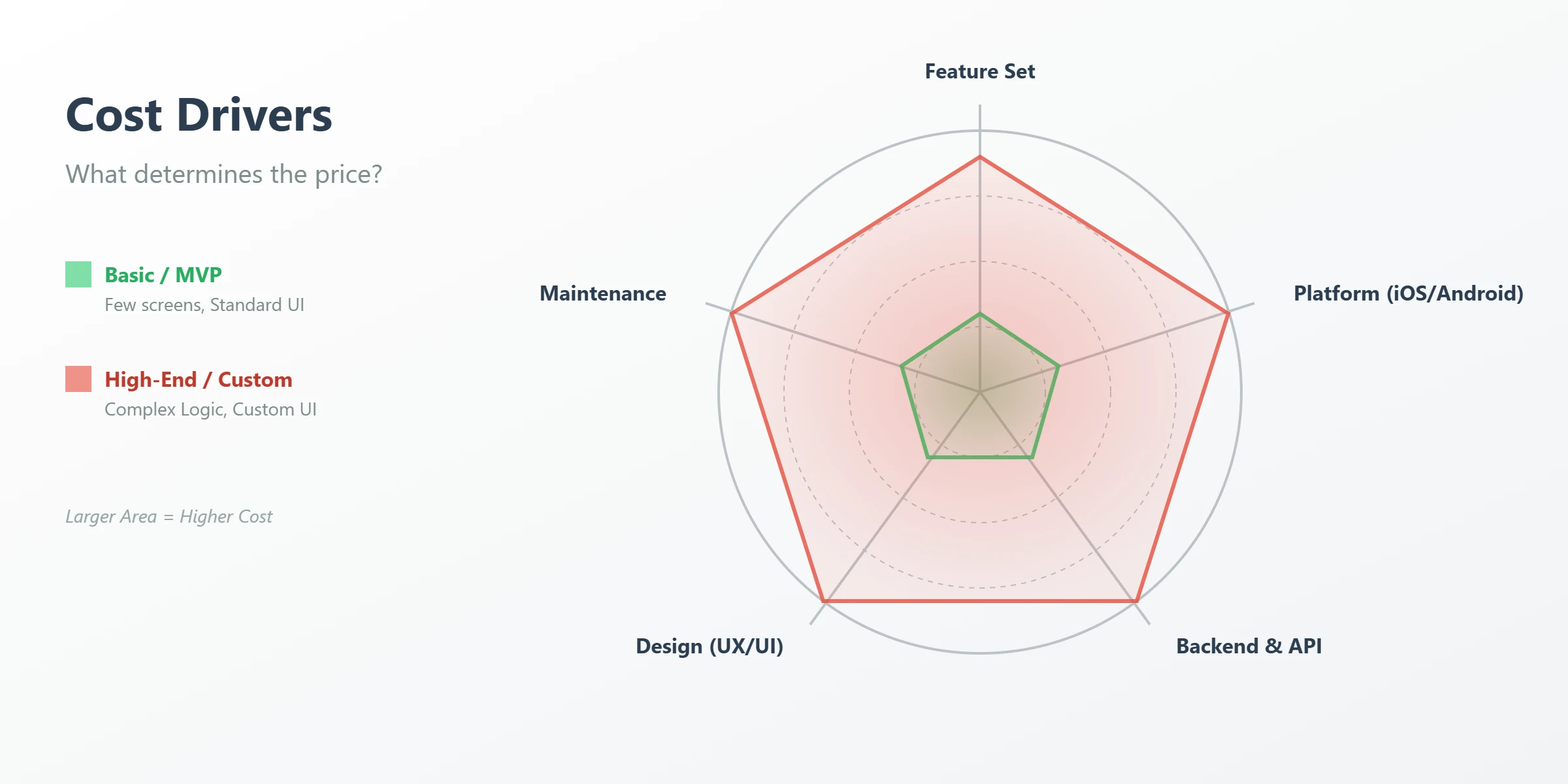
Why do app development prices differ so dramatically, even for seemingly similar ideas? The answer lies in the details: features, technology, design, and long-term operations determine the price. Understanding these factors helps you make conscious decisions and avoid unnecessary expenses.
Features & Integrations
Every additional feature increases complexity. Push notifications require infrastructure, clean logic, and testing across many devices. In-app purchases bring legal requirements and additional error sources. External integrations like payment providers increase both development and maintenance effort.
Platform Choice (iOS / Android / Web)
An application for two platforms isn't simply "upload twice." Each platform has its own technical requirements and design guidelines. For iOS and Android, features must be tested separately, bugs fixed individually, and updates coordinated.
Backend & Admin
Modern applications are primarily backend projects. User management, logic, and security run behind the scenes. Typical building blocks include an API, structured database, and admin panel. The more complex the business logic, the higher the effort.
UI/UX & Number of Screens
Each additional screen means concept work, UI/UX design, implementation, testing, and coordination. The chain is clear: more screens → more design → more engineering → more quality assurance.
Early wireframes and clean mockups help control expenses. Changes late in the process are especially costly since they affect multiple teams. Anyone who approaches this methodically can steer their app development cost much more effectively.
Bottom line: high expenses emerge from the interplay of features, technology, design, and operations. Knowing these drivers helps you make better decisions technically, financially, and strategically.
Native vs Cross-Platform vs PWA: Costs & Trade-offs
The choice of technical approach has a huge impact on how high your final expenses will be. At the same time, it determines how quickly you can go live, how well the application performs, and how demanding maintenance and evolution become. There's no "best" solution for everyone only the right one for your goal, budget, and timeline.
Native Development (iOS / Android Separate)
Native building creates a separate product for iOS and Android. This pays off especially with high demands for performance, stability, and access to hardware functions like camera or sensors. The downside: two codebases mean higher expenses and more effort for testing and maintenance. Ideal for scaling products with high quality standards.
Cross-Platform / Hybrid
Cross-platform approaches use shared code for multiple platforms. This lowers effort and accelerates launch particularly attractive for an initial MVP. A hybrid solution allows you to cover iOS and Android with one team. However, there are limitations with complex or hardware-intensive features, sometimes requiring additional native modules.
PWA as Budget Option
A PWA is technically a web application that feels like a native product. It works well for content platforms, internal tools, or simple service applications. The biggest advantage is a low cost of a mobile app and quick rollout. The boundaries show up when accessing hardware functions and offline mode.
| Approach | Cost Trend | Time-to-Market | Maintenance | Best for |
|---|---|---|---|---|
|
📱
Native
|
High | Slower | High | Performance-critical apps, complex features |
|
🔁
Cross-Platform
|
Medium | Fast | Medium | MVPs, business apps, limited budget |
|
🌐
PWA
|
Low | Very fast | Low | Content, internal tools, simple scenarios |
The right approach is always a strategic decision. Anyone who realistically assesses goals, users, and growth can not only save expenses but also avoid technical dead ends down the road.
Hourly Rates & Provider Models: What Does a Developer / Agency Cost?
Beyond feature scope and technology, your chosen provider model strongly influences the mobile app development cost. Whether freelancer, agency, or own team each option affects price, risk, and controllability. In 2026, it's worth taking a close look at the differences.
Freelancer vs Agency vs In-House Team
Freelancers are often flexible and affordable, ideal for clear tasks or early phases. Downsides: dependence on one person, limited availability. Project management and quality assurance usually fall to you.
An agency offers structured processes, experienced project management, and multiple specialized roles. Risks are distributed, but expenses are higher due to coordination and overhead. For more complex applications, often the more stable choice.
An in-house team gives you control but means fixed costs and recruiting effort. Rarely economical for an MVP.
Sample Hourly Rates & What's Included
The following figures serve as rough orientation for 2026. Region, specialization, and project type can significantly influence the values.
| Type | Hourly Rate (approx.) | Typically Included | Often Not Included |
|---|---|---|---|
|
🎓
Freelancer (Junior)
|
€40–60 | Development, basic coordination | Concept, testing, project management |
|
👨💻
Freelancer (Experienced)
|
€60–90 | Development, consulting | QA, backup coverage |
|
💎
Freelancer (Specialist)
|
€90–130 | Specialized expertise | Project management |
|
🏢
Agency (Standard)
|
€80–120 | Project management, QA, development | Comprehensive strategy |
|
👑
Agency (Premium)
|
€120–180 | End-to-end delivery, consulting, highest quality standards, enterprise focus | – |
A higher hourly rate doesn't automatically mean higher total expenses. Structured processes and clear responsibilities save time and prevent corrections. What's decisive is the fit with your budget, experience, and project complexity.
The choice of model strongly influences expenses, quality, and risk. Anyone who looks at the complete package makes the better long-term decision.
Real-World Example: SportsForce – A Recruiting App for the US Market

To make this more tangible, here's one real project from our own practice — just one example of how these numbers play out in the field. A US-based sports recruiting company had run a web platform with thousands of users for over a decade and wanted to turn it into a mobile app built on a Tinder-style swipe model, matching student athletes with college coaches.
The client's team initially tried to build the app entirely on their own using a no-code platform (FlutterFlow). That worked fine for simple screens, but once it came to custom swipe logic, a multi-step matching system, and syncing with the existing backend, the team hit a wall. That's when an external FlutterFlow developer joined the project on an outstaffing basis.
The scope included:
- two distinct user roles (athletes and college coaching staff)
- a matching system where contact happens between an athlete and an entire coaching staff, not just a single coach
- custom candidate lists with search and filtering
- a ranking algorithm that filters candidates by hard requirements first, then sorts the rest by athletic and academic fit
- photo and video uploads built directly into profiles, including a custom video player
- distance calculation using the haversine formula instead of a paid Google Maps integration, to avoid ongoing API costs as the user base grows
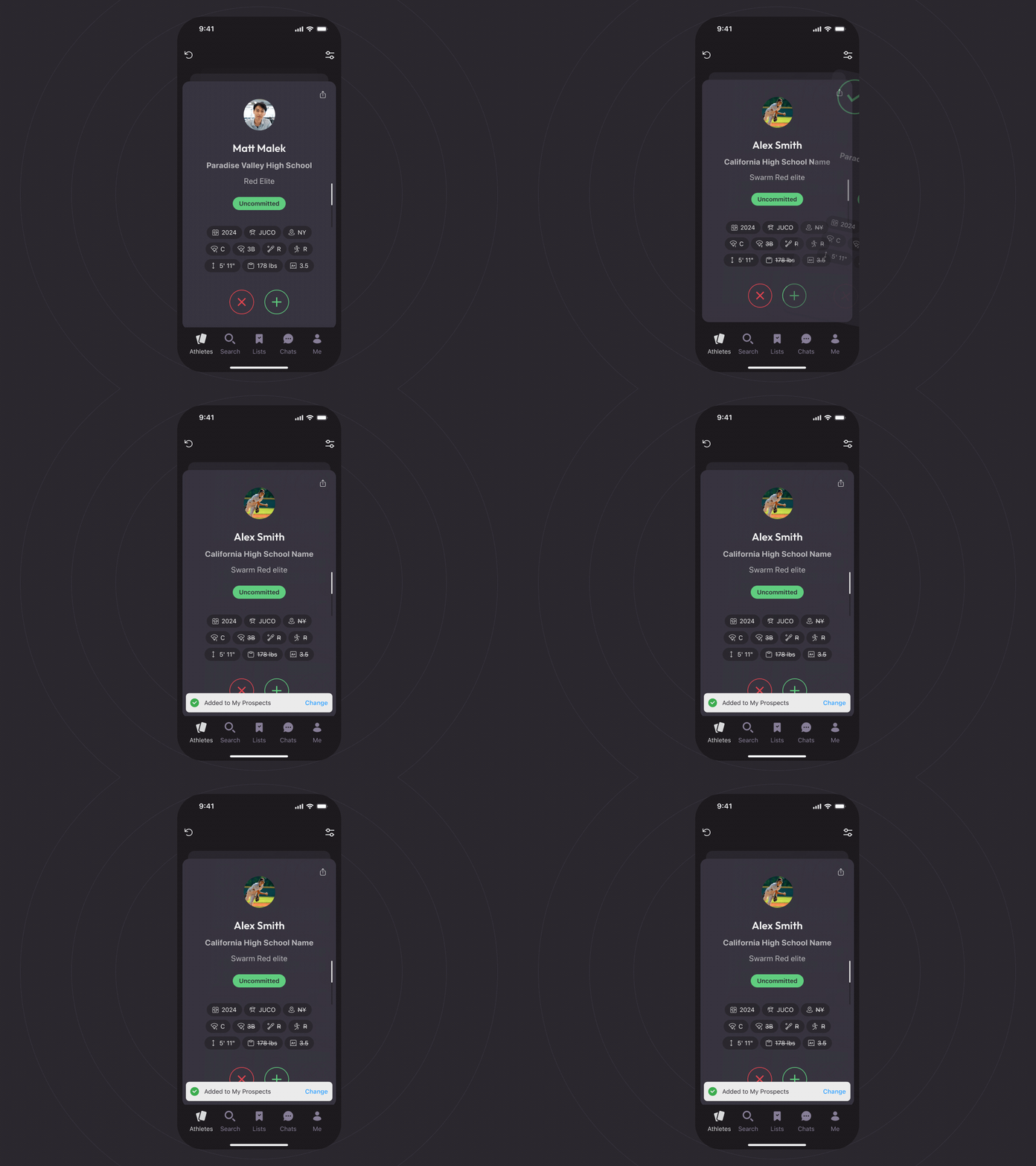
The developer worked embedded in the client's team, on the client's schedule and timezone, from February through December 2025. Costs were billed across two phases as the scope grew:
| Phase | Duration | Monthly Hours | Rate | Cost |
|---|---|---|---|---|
| 🚀 Phase 1 (ramp-up) | 3 months | 80 h | ~€31/h | ~€7,400 |
| 📈 Phase 2 (scaled up) | 6 months | 160 h | ~€31/h | ~€29,600 |
| 📊 Total | ~€37,000 | |||
One important detail: the app already had a finished UI/UX design from another vendor. If the design had to be built from scratch for a project of this complexity, that would typically add roughly €40,000 on top of the development cost above.
The stack: FlutterFlow on the frontend, Supabase as the backend. It's a good illustration that no-code tools can handle genuinely complex, custom logic — as long as there's real engineering expertise behind the build.
Examples & Mini-Calculations: How a Price Comes Together
Concrete examples make it much easier to understand how much it costs to build an app than general price ranges alone. The following simplified calculations for 2026 show typical breakdowns not as fixed prices, but for better estimation of effort and priorities.
Example "Simple Application" (Few Screens, Minimal Backend)
This scenario is perfect for a lean MVP or internal tool. With few screens, clear purpose, and minimal backend logic, technical effort remains manageable. Here, clean conception is especially important.
| Area | Share | Example Cost |
|---|---|---|
|
🧭
Concept
|
approx. 15 % | €3,000 |
|
🎨
Design
|
approx. 20 % | €4,000 |
|
💻
Development
|
approx. 50 % | €10,000 |
|
✅
Testing
|
approx. 15 % | €3,000 |
|
📊
Total
|
100 % | approx. €20,000 |
Testing here saves time and expenses later. Effort remains controllable when scope and goal are defined.
Example "Complex Application" (2 Platforms + Backend)
This involves a full-fledged business or customer solution for iOS and Android. More user roles, complex interfaces, and a central backend drive expenses upward. This is exactly where the most important drivers become visible.
| Area | Share | Example Costs |
|---|---|---|
|
🧭
Concept & Architecture
|
~10 % | €10,000 |
|
🎨
UI/UX Design
|
~15 % | €15,000 |
|
📱
Development (2 Platforms)
|
~35 % | €35,000 |
|
🧩
Backend & API
|
~25 % | €25,000 |
|
✅
QA & Testing
|
~10 % | €10,000 |
|
📊
Total
|
100 % | ~€95,000 |
The backend becomes the biggest expense block: data logic, security, user management, and performance demand their toll. Additional integrations like payment, CRM, or analytics tools increase engineering and testing effort further. Testing also grows disproportionately since two platforms and more logic must be secured.
These examples make clear why expenses can never be reduced to a single factor. Anyone who understands where the money actually flows can prioritize more consciously and implement their solution purposefully within the appropriate budget framework.
Ongoing Expenses After Launch: TCO Instead of Just Build Costs
Many underestimate the ongoing expenses after launch and focus only on initial building. But Total Cost of Ownership (TCO) also includes regular expenses that are just as important and directly impact the cost of running an app.
Maintenance, Updates, Bugfixes, OS Changes
Even after launching your product, expenses continue to accumulate especially for maintenance, updates, and bugfixes. As a rule of thumb, you can expect annually about 10–20% of the original budget. With initial expenses of $50,000, that's between $5,000 and $10,000 per year.
Why is this important? New versions of iOS and Android often require adjustments, security updates must be installed, and sometimes optimizations for new devices are needed. Only this way does your product remain stable, secure, and usable long-term.
Hosting/Cloud, APIs, Monitoring, Analytics
Another important expense factor is hosting and cloud services. Especially as the product grows and has more traffic, server expenses rise. While small solutions still get by with affordable options, larger projects often need powerful cloud services.
APIs and external integrations also bring ongoing expenses. These must be maintained and monitored. Analytics and monitoring tools help identify problems early and improve user experience.
The app development cost isn't just determined by initial building. Anyone who realistically estimates TCO avoids nasty surprises and plans successfully for the long term.
Low-/No-Code 2026: How to Lower Your Expenses
The cost to make an app can quickly spiral especially when you need a custom solution for every detail. But in 2026, there are smart alternatives: low-code and no-code platforms. They help implement projects not just faster, but also significantly cheaper. But the question remains: when do these tools really pay off and where is traditional engineering still the better choice?
When Low-/No-Code Really Saves Money
Low-code and no-code have evolved significantly and are especially good for smaller projects or first versions. They're particularly useful in these cases:
- MVP (Minimal Viable Product): Ideal for quick validation of ideas without deep programming knowledge
- Internal Applications: Perfect for simple tools like forms or workflows with custom adaptation
- Simple Portals and Admin Panels: A budget-friendly option for straightforward admin interfaces with clear functional requirements
In such scenarios, low-code or no-code platforms can substantially reduce the MVP app cost while accelerating time-to-market.
Limits & Hidden Expenses
Despite the advantages, there are critical limitations. Vendor lock-in can make later platform switches expensive. With growing user numbers, these solutions often hit their scalability limits. Pre-built interfaces limit complex integrations, and compliance requirements like GDPR are frequently not fully covered. What initially looks like a savings program can end up being more expensive than a custom solution due to hidden expenses and limitations.
Decision Checklist
Before you decide on low- or no-code, consider these points:
- Do we need offline mode? Low-/no-code platforms don't always support offline operation, which may be required for certain solutions
- Do we need device features like camera or GPS? If your product relies on special hardware functions, low-/no-code platforms may not be sufficient
- Is custom UI needed? For highly individualized user interfaces, a no-code platform may offer limited design possibilities
- Will the solution need to scale to 100K+ users? If your project needs high scalability, low-/no-code options can quickly reach their limits
- Are complex integrations required? External APIs or integrations can be harder to implement with low-/no-code platforms
- Do we have specific GDPR requirements? Ensure the platform is GDPR-compliant especially if your solution handles personal data
- Is time-to-market critical? If you're aiming for quick market entry, low-code and no-code solutions are ideal. They dramatically accelerate the process and help bring your product live without long waiting times
This helps you evaluate the low-code or no-code option in relation to your specific requirements and budget.
Not sure which path is right for your project?
Schedule a free 30-minute consultation with our experts — we’ll help you choose the smartest strategy for your app.
Book a call →Saving Costs Without Quality Loss
Building software can get expensive, especially when you pack in lots of features. But there are ways to reduce expenses in 2026 without sacrificing quality.
MVP & Scope (Must-Have vs Nice-to-Have)
A clearly defined MVP helps you focus on truly necessary functions and add "nice-to-have" features later. This keeps your feature set under control, limits scope, and saves money while your product reaches the market faster. A lean start has another advantage: you receive early feedback from real users that flows directly into further evolution.
One Platform First / Prototype
Build a prototype for just one platform first to test market acceptance. This reduces risk and initial expenses. If successful, the solution can later be expanded to a second platform. This way you avoid double investments in untested ideas and adapt the product specifically to user needs.
Compare Quotes
Before deciding on a provider, compare quotes. Look not just at price, but also at quality and details:
- Clear phases and milestones: A good quote should contain clear project phases and milestones so you can monitor progress. This prevents surprises and lets you steer the project efficiently
- Detailed feature scope: The feature scope should be precisely described so no unplanned expenses arise later
- Quality assurance (QA): Is QA included in the price? Good quality assurance ensures your product runs stably and errors are fixed promptly
- Code ownership: You should have full rights to the code to make changes later or further evolve the software
- Post-release support: Check if post-release support is included in the quote. This is important for updates and bugfixes after launch
- Transparent pricing structure and project management: A transparent quote should clearly communicate all expenses and project management phases. This helps avoid hidden additional fees
This ensures you get a fair and transparent quote both in terms of quality and expenses.
Conclusion: Finding the Right Path for Your App Development
The app development cost in 2026 is determined by several factors. Feature scope is central: the more features and complex functions you integrate, the higher the expenses. The choice of platforms whether just iOS, just Android, or both also significantly affects the price. Additionally, backend requirements and engineering quality determine total expenses.
The ongoing expenses after launch shouldn't be underestimated: regular updates, maintenance, and support account for about 10–20% of the initial budget. These should be planned from the start.
If you're unsure whether low-/no-code is sufficient for your project or which technology fits best, professional guidance can bring clarity. Understanding your cost of a mobile app from all angles initial building, ongoing operations, and long-term scalability helps you make informed decisions and create a solution that serves your business goals without breaking the bank.
Frequently Asked Questions
What does it cost to have an app programmed in 2026?
The price range runs from about $10,000 for a simple MVP up to over $250,000 for complex solutions. The final app development price depends heavily on the desired feature scope. Our tip: Start with a clear list of your core functions to narrow down the framework.
Why are expenses so different?
Multiple drivers influence the price: platforms, features, backend, design, team, and timeline. Your project's complexity substantially determines the expenses. Our tip: The more detailed your vision is, the more accurate the estimate can be.
What's cheaper: native or cross-platform?
Typically, cross-platform building with frameworks like Flutter or React Native is initially about 20–40% cheaper since one codebase is used for both systems. For solutions requiring maximum performance and user experience, a native product may be the better choice. Our tip: Get advice based on your requirements on what makes more sense for your budget and project.
How much budget should I plan for maintenance?
Plan annually about 10–20% of initial expenses for maintenance and ongoing operations. This covers operating system updates, bug fixes, security updates, and minor adjustments. This TCO is essential for long-term success. Our tip: A maintenance contract with your provider brings planning security.
Can I build a professional app with no-code?
For simple solutions, no-code tools are ideal for quickly testing an MVP. With custom features or scalability, you'll hit limits. Our tip: Test your idea with no-code, but invest in custom engineering for growth.
What info does an agency need for a quote?
For an accurate quote, you need information on target audience, features, platforms, design, timeline, and budget. Thorough conception enables precise effort estimation. Our tip: Create a brief requirements document (at least 1–2 pages) before the conversation.
How long does building typically take?
An MVP often emerges in 3–6 months. Complex solutions with many features need 6–12 months or longer. The timeframe depends on scope and team size. Our tip: Realistic time planning avoids pressure and quality losses.