Best Mobile App Development Frameworks 2026: A Developer's Guide


Choosing suitable mobile app development frameworks for different projects sounds easier than it is. A project can move fast with the right tool and stall completely with the wrong one. Many teams face the same moment of hesitation: too many choices, too many promises, and no clear sign of what will hold up under real deadlines.
2026 adds even more noise. Some frameworks grow up and change direction. Others appear out of nowhere and try to solve old problems in a new way. React Native rolls out a different architecture. Flutter sharpens its focus on smooth UI and better rendering. Expo trims the setup steps. Kotlin Multiplatform gains attention from teams that want shared logic without giving up native UI work. Even PWA tools feel more serious now, as browsers open access to features that used to be off-limits.
This guide walks through the main groups — native, cross-platform, hybrid, and PWA. The goal is simple: give developers, tech leads, CTOs, and startup founders a grounded view of what each option offers, without hype, without guesswork.
Why Knowing the Difference Between Mobile App Development Frameworks Matters
Selection of a toolkit determines nearly everything that will occur later in a project. It influences the speed of features delivery by a team, the work cost, and the cost of support in case the application becomes bigger. Misjudging slows developers down. A good fit eliminates friction and allows the product to flow without the continual rewrites.
The initial things that teams experience are time and money. Maintenance matters as well. A simple project may turn into a difficult one when the structure of the project is not properly updated, or when the community is not healthy.
There’s also the scale factor. The product that starts as a prototype can grow into a high-traffic product achieved by a prototype; thus, approaching limits that might have not been visible in the initial stages. Numerous teams paid their price on this.
Statista records that the number of mobile developers is over 6.6 million globally, with three-quarters stating that a framework is the most significant decision at the initial stage. It’s easy to see why. Taking the wrong direction leads to delays, redesign and wasteful budget.
The primary ones are simple: native such as Swift and Kotlin, cross-platform, such as React Native and Flutter, hybrid, such as Ionic or Cordova, and PWA, which operates with the help of the browser.
In this guide, we’ll examine the best mobile app development framework to help you navigate this decision.
Frameworks seem too overwhelming? Leave your project to professionals and reap the rewards!
The Evolution of Mobile App Development Frameworks in 2024–2026
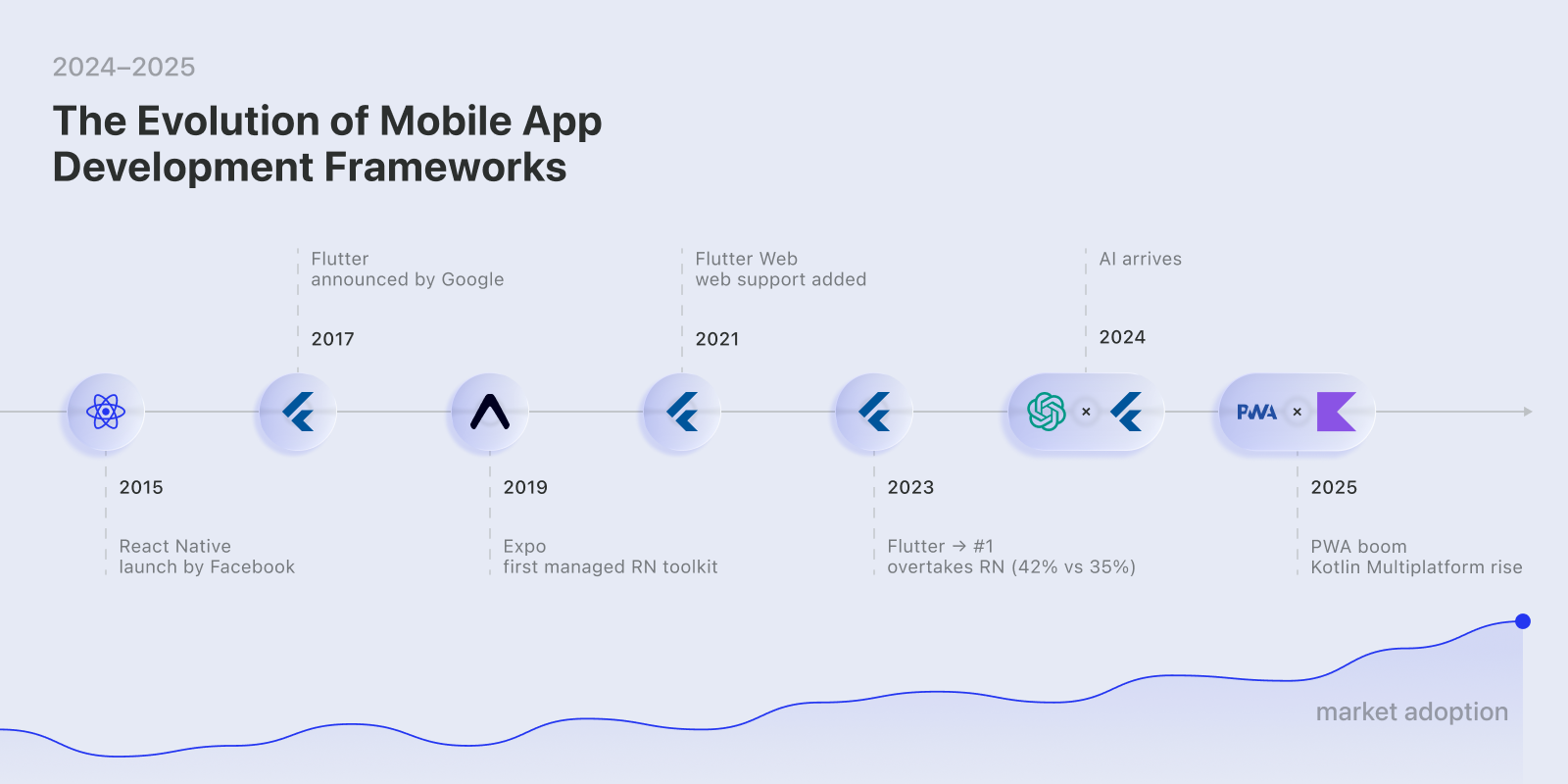
Looking back at the last five years, the changes in the toolset for building mobile applications feel almost continuous. React Native and Flutter were the two names that dominated in terms of decision making in 2020. The two boasted of large communities, off-the-shelf packages and carried just enough stability to carry products with long roadmaps. The majority of firms opted to take one of them merely because they felt that the alternatives appeared too crude.
New choices began to emerge in 2022 and 2023. Expo reduced the set up weight of React Native teams. Tauri came out with another concept of security and size of bundles. Svelte Native demonstrated how even smaller ecosystems could be comfortable to develop with. Those tools did not substitute the top options, but provided the developers with space to experiment.
The period of 2024 to 2026 stepped even higher. AI aspects are becoming more sophisticated. Flutter became hookable to Google Gemini API. React Native improved its debugging and build tooling. Performance tuning was not something incidental — it was always given central attention. In virtually every major release, there were improvements in DX, such as faster hot reloads and improved profiling. If AI-assisted workflows are part of your roadmap, it's worth exploring the AI workflow automation guide alongside your framework selection.
The ecosystem also became more specialized. Some mobile app frameworks shifted toward IoT work, others toward VR or wearables. Teams that needed hardware-level access got more targeted tools instead of one-size-fits-all solutions.
Interest in PWA technology grew as well. Modern browsers exposed APIs that were once limited to native code, making PWA a practical alternative for certain products rather than a compromise.
Understanding Different Types of Mobile App Development Environment
The building usually starts with one decision: how deep a team wants to go into each platform. The choice defines the project’s speed, long-term cost, and how flexible the product will feel once features pile up. The four groups below cover the main approaches used in 2026.
Native Mobile App Development Frameworks
Native tools rely directly on what Apple and Google provide. On iOS, that means Swift or SwiftUI. On Android, Kotlin together with Jetpack Compose. These toolchains sit closest to the hardware layer. They expose all device APIs without wrappers, and they allow UI patterns that match each platform’s expectations.
The downside is duplication. iOS and Android require their own codebases. Every feature needs to be built twice unless shared logic is extracted manually. This results in taking more engineering hours, and releases need extra coordination.
Native development is most practical when an app handles real-time workloads, heavy rendering, complex offline logic, or hardware-specific tasks such as advanced camera flows, Bluetooth operations, or motion tracking. When reliability and speed matter more than budget, the native route remains the safest option. Teams considering this path should also think through app development cost early, since dual codebases significantly affect budget planning.
Cross-Platform App Development Library
React Native, Flutter and Xamarin have a shared-code approach. Majority of the logic resides within a single project. That one particular project is then ported over or cross-platformed to iOS and Android. The concept is straightforward: to provide a more uniform behavior with the minimum amount of repetition.
These benefits are not difficult to notice. A single codebase is more cost-effective to keep. Features can be developed by small teams. Updates roll out in sync. JavaScript has got a very large ecosystem which React Native enjoys. Xamarin is compatible with the .NET environments.
Mixed platform models do not eliminate edge cases. Native modules are needed in some of the animations or gestures. Some of these device integrations are not equally compatible across platforms. Mixed layers are more difficult to debug.
The MVPs, startup products, medium-complexity business solutions, and time-to-market projects can use these tools. They minimise friction although they might need additional tuning in the future.
Hybrid App Development Frameworks
Hybrid solutions, such as Ionic, Cordova and components of NativeScript, consume a web interface inside a native container. The UI is coded in HTML, CSS, and JavaScript, and the wrapper offers the access to the device features using the plugins.
The biggest advantages of hybrid app development frameworks are familiarity. Mobile requires little retraining among web developers. There is rapid assembly of prototypes. It may signify that without constructing two indigenous teams, internal tools or basic customer applications can be provided. The maintenance of the plugins is not the same and not all the features of the device can be completely supported.
Progressive Web (PWA) Stack
A PWA relies on the common web technologies, yet it is utilized in a manner of lightweight mobile applications and is developed and used by teams building with React, Vue, Angular, or other similar mobile app development frameworks. Off-line caching is made possible by service workers. The push notifications are compatible with most modern browsers. PWAs can be installed on the home screen by the user without going to store.
The popularity of PWAs rose at the time of increased browsers. Tinder, Starbucks, and Twitter among others are using PWAs to reduce friction during installation and achieve low-end devices or slow internet levels.
A progressive web app framework is used when it requires products to be reached instead of deeply integrated native: content platforms, booking apps, dashboards or services that already have a robust web presence.
Top 10 Mobile App Development Frames: Comparative Views
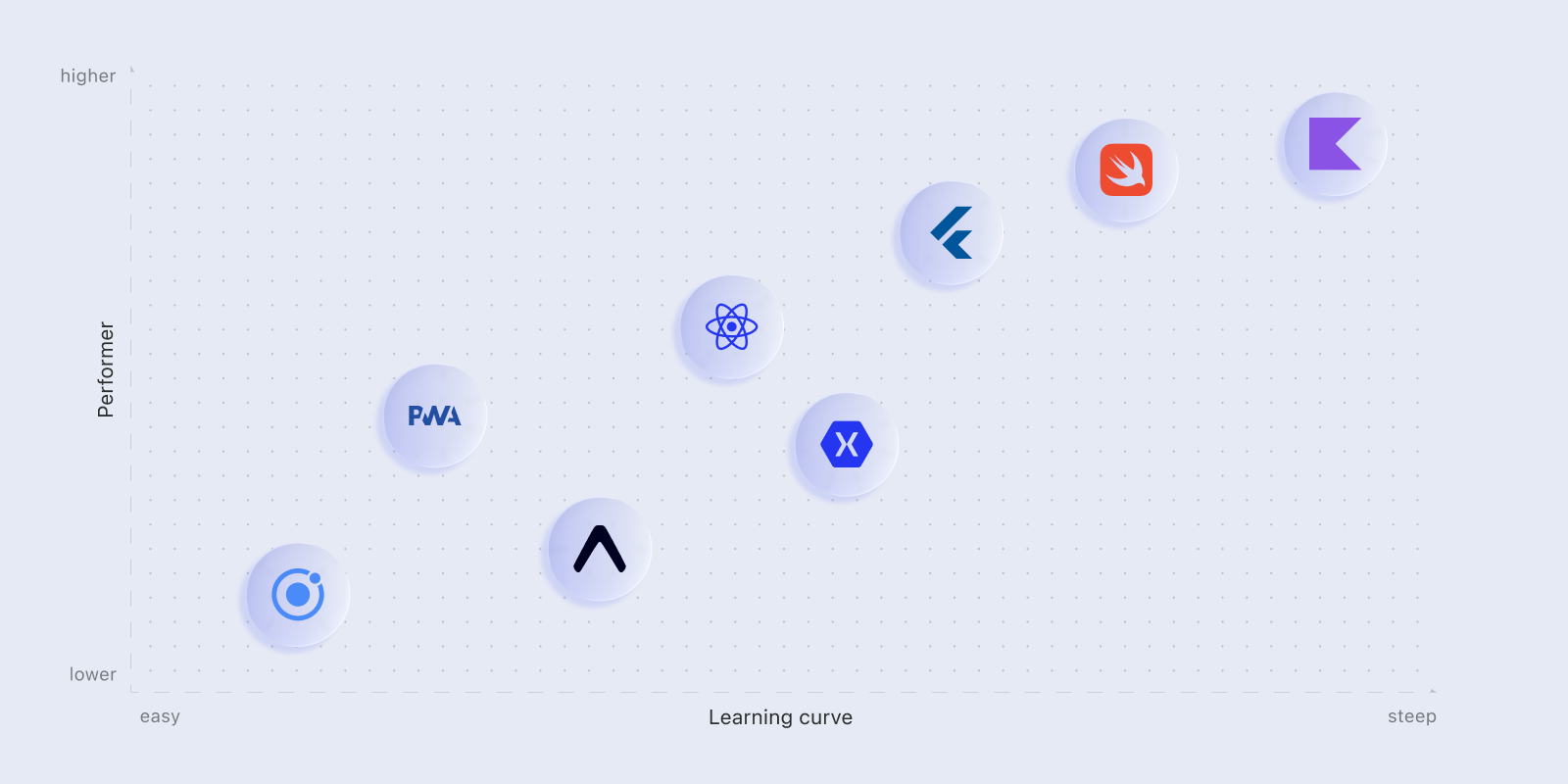
The toolkit that teams select are frequently ones that it is comfortable with when a different form of problem is to be solved by each approach. The following is a realistic list of the top mobile app frameworks 2026, along with the high-level specifications that developers tend to consider prior to devoting themselves to a stack.
React Native
React Native stays a frequent first choice because it blends native UI with a familiar JavaScript workflow. Teams move fast, and most common patterns already exist as packages.
Key parameters:
- Creator: Meta
- Language: JavaScript / TypeScript
- Platforms: iOS, Android, Web
- Learning curve: Medium
- Community: ⭐⭐⭐⭐⭐
- Best for: MVPs, JS-driven teams, rapid cross-platform delivery
Facebook, Instagram, and Shopify rely on it for real production work. The ecosystem is one of the richest, which cuts down building time for many early features.
Flutter
Flutter focuses on consistent UI and smooth rendering. It controls the entire drawing process, so visuals behave identically across platforms.
Key parameters:
- Creator: Google
- Language: Dart
- Platforms: iOS, Android, Web, Desktop
- Learning curve: Medium–High
- Community: ⭐⭐⭐⭐
- Best for: Custom UIs, performance-sensitive solutions, long-term scaling
Brands like Google Ads, BMW, and Alibaba ship Flutter apps. Tooling and hot reload make iteration comfortable once the basics are learned. For teams exploring Flutter-specific agencies, the best FlutterFlow app development agencies list is a practical reference.
Expo
Expo trims setup and hides low-level configuration behind a managed workflow. Many teams use it to get a working build within minutes.
Key parameters:
- Language: JavaScript / TypeScript
- Platforms: iOS, Android
- Learning curve: Low
- Community: ⭐⭐⭐⭐
- Best for: Prototypes, small applications, junior-friendly environments
It offers prebuilt modules and a simple publishing pipeline. Flexibility is lower than bare React Native, but the trade-off pays off for quick experiments or early-stage teams.
Xamarin
Xamarin is aimed at C-sharp and the .NET-based teams. It also compiles to native code and it is fully integrated with Visual Studio.
Key parameters:
- Creator: Microsoft
- Language: C#
- Platforms: iOS, Android
- Learning curve: High
- Community: ⭐⭐⭐
- Best for: Enterprise systems, .NET-heavy teams
There is reliability in performance and maintaining large codebases is maintained with the help of type safety. It is a small ecosystem and the overhead associated with licensing is appropriate, yet in enterprise settings this would be the natural choice.
Ionic
Ionic lets web developers transition to mobile quickly. It uses familiar web technologies and wraps them inside a native shell.
Key parameters:
- Language: JS/TS with Angular, React, or Vue
- Platforms: iOS, Android, Web
- Learning curve: Low
- Community: ⭐⭐⭐⭐
- Best for: Cross-platform, fast delivery, web-first teams
It’s great for simple apps and internal tools. Performance on older devices may drop, but go-to-market speed often outweighs this for many business cases.
NativeScript
NativeScript provides immediate access to native APIs via the JavaScript or TypeScript language. That brings performance closer to native without Swift and Kotlin.
Key parameters:
- Language: JavaScript / TypeScript
- Platforms: iOS, Android
- Learning curve: Medium
- Community: ⭐⭐⭐
- Best for: Software requiring deep native access
The іscaffold is appropriate with teams requiring hardware-level integration and enjoying JS tooling. Less coverage of ready-made features lead to the increased amount of exclusive work over React Native or Flutter.
Tauri
Tauri is written in Rust in the backend and in UI in JS/TS. It is security conscious and has very small bundle sizes.
Key parameters:
- Language: Rust + JS/TS
- Platforms: iOS, Android, Desktop
- Learning curve: High
- Community: ⭐⭐⭐
- Best for: Security-focused builds, Rust-driven teams
It is also in its infancy on mobile but it is highly performing. The current production is mainly concentrated in desktop use, although mobile attention gets more.
Kotlin Multiplatform (KMP)
KMP shares logic across platforms while keeping native UI layers intact. That gives a balance between reuse and platform fidelity.
Key parameters:
- Creator: JetBrains
- Language: Kotlin
- Platforms: iOS, Android, Web, Desktop
- Learning curve: Medium–High
- Community: ⭐⭐⭐⭐
- Best for: Kotlin-first teams, enterprise, long-term projects
KMP components are already utilized by such companies as Netflix and Slack. The approach builds on Kotlin expertise and improves maintainability.
Vue Native
Vue Native adapts Vue syntax for mobile by mapping components to React Native under the hood.
Key parameters:
- Language: JS/TS (Vue)
- Platforms: iOS, Android
- Learning curve: Low
- Community: ⭐⭐⭐
- Best for: Vue teams, small and mid-size solutions
It assists vue developers to cross over into mobile easily. The ecosystem is simple and certain libraries seem experimental, however, onboarding is quick.
Angular NativeScript
This stack brings Angular’s structure into mobile through NativeScript’s runtime.
Key parameters:
- Language: TypeScript (Angular)
- Platforms: iOS, Android
- Learning curve: Medium–High
- Community: ⭐⭐⭐
- Best for: Enterprise workflows, Angular-heavy teams
It is appropriate to teams that already have Angular codebases and wish to reuse their patterns. Angular is complex and heavy to mobile applications, yet consistency is beneficial to large teams.
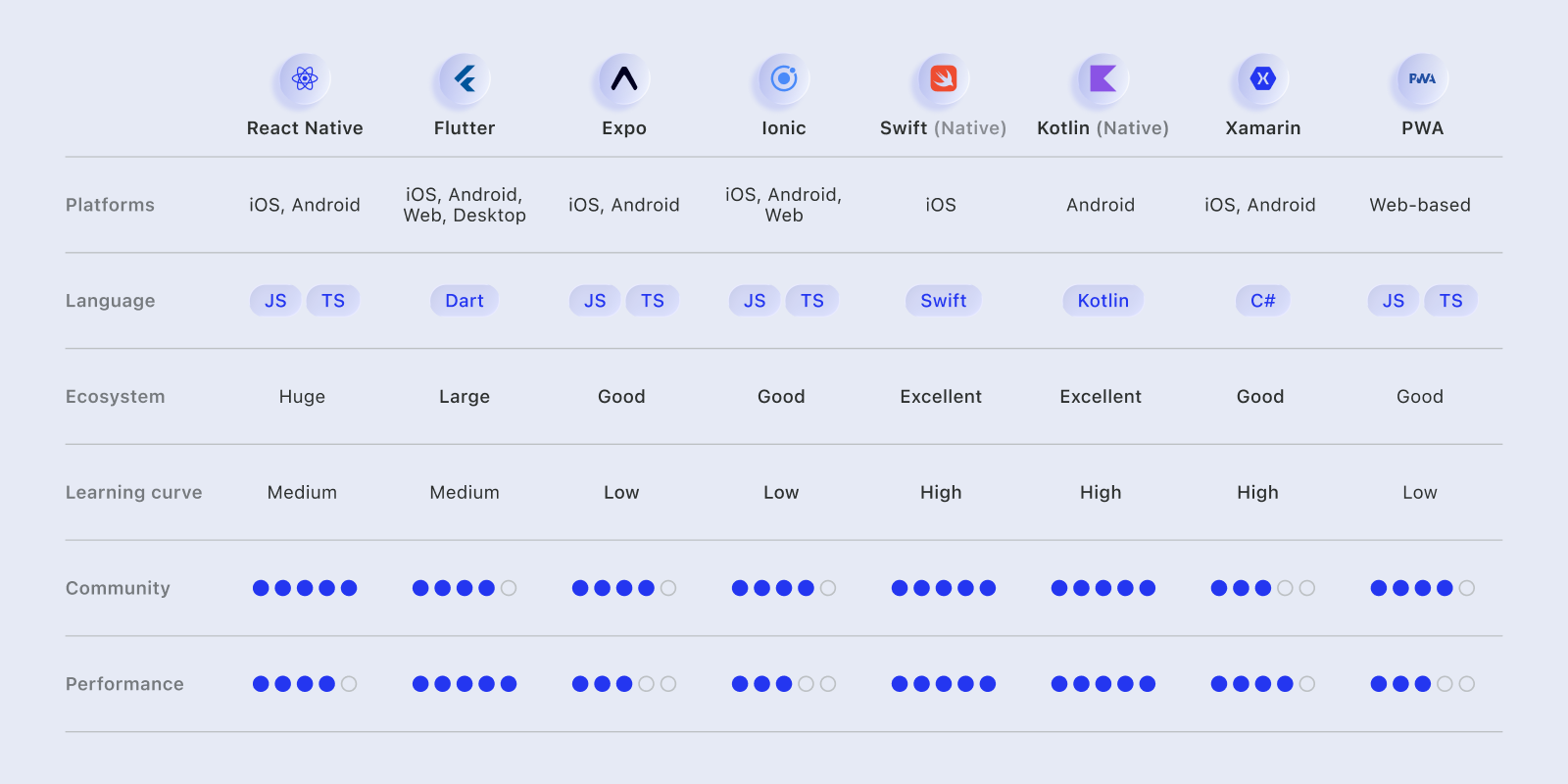
Comparison Table: Key Metrics
How to Choose the Right Mobile App Development Framework for Your Project
Choosing a library is rarely a single-factor decision. Teams usually balance several constraints: the scope of the product, deadlines, budget, and the skills they already have. Breaking the process into smaller checks makes the decision more predictable and less tied to guesswork.
Assess Your Project Requirements
According to the plan: Starting with the fundamentals: What platforms do you need to support? A single-platform takes one direction; a single-platform-product takes another. It is also important in terms of the feature complexity. A plain interface and plain contents will not justify the same stack as an application with complex UI hardware, real time feeds or offline interaction.
Native or Flutter tend to shine where the app must provide solid rendering under high load. Budget and timeline are also factors. Small teams with tight deadlines tend to favor shared-code methods. Before writing a single line of code, reviewing software development cost benchmarks helps teams calibrate realistic expectations.
Evaluate Team Skills and Experience
Assess your team on what they already know. JavaScript, Kotlin, C#, Dart. Different backgrounds mean different comfort zones. React Native reacts quicker to a React-focused group. An Xamarin conversion will not frustrate a .NET team. The previous mobile experience is also a factor; otherwise the learning period may be longer than anticipated. Consider the speed of onboarding. Good ecosystems tend to diminish long term slowdowns.
Consider Long-term Maintenance and Scalability
Most projects grow. The structure must be in place to accommodate that expansion without making each update a rewrite. Review the release scheduling of the project, issue fixes, and roadmap. Some tools are updated frequently; others slow down and that introduces technical debt. Another consideration is the availability of talent. If a stack has a small pool of developers, hiring becomes a bottleneck. Partnering with experienced app development companies can also mitigate this risk, especially for enterprise or long-horizon products.
Decision Matrix Example
Performance mapping overview:
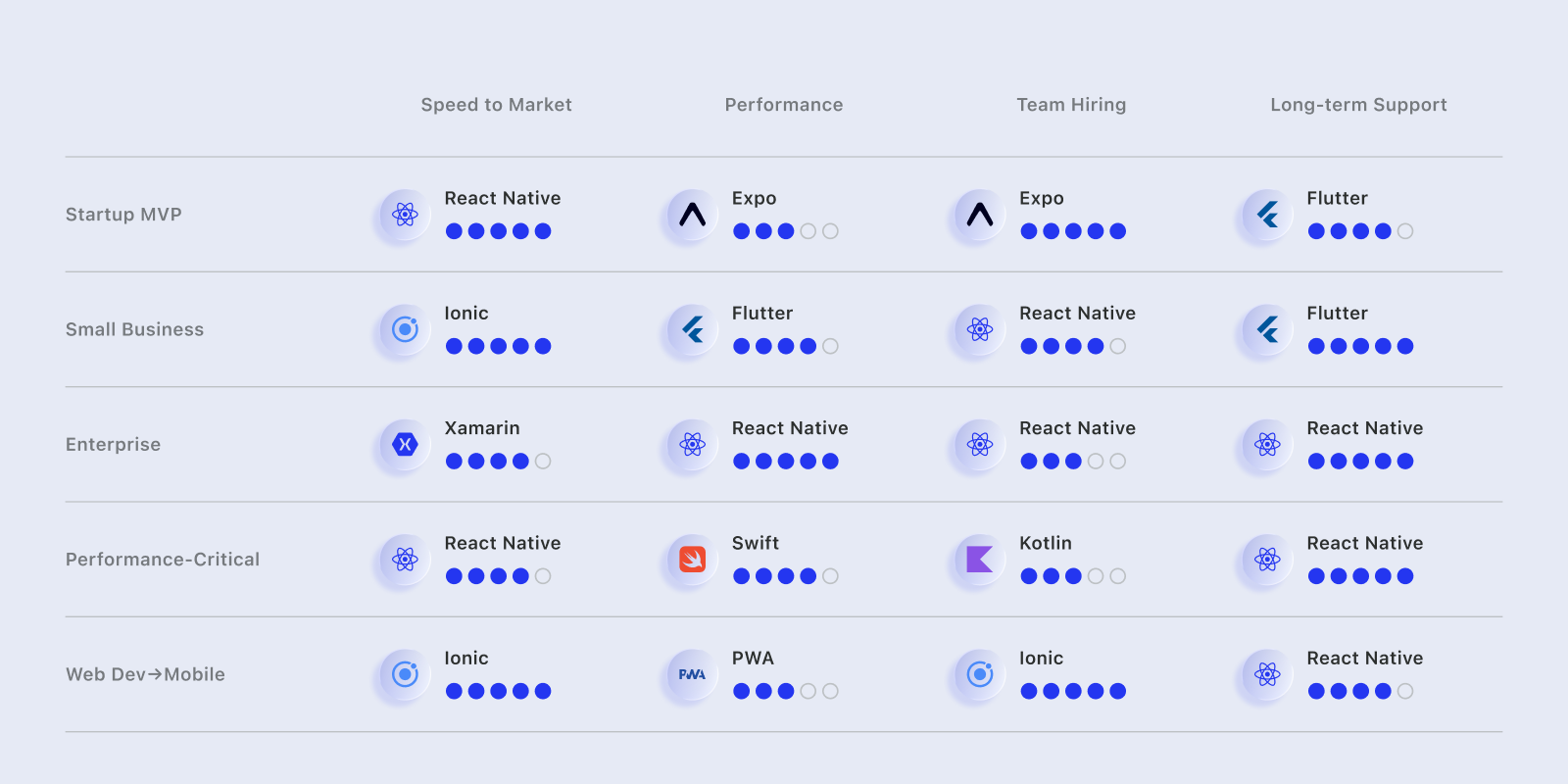
This matrix does not decide, yet it will help reduce the number of options prior to qualitative reconsideration.
Current Trends in Frameworks (2026)
The past year pushed the mobile environment in several clear directions. None of these trends exist in isolation; they overlap and shape how teams design and maintain apps. Below — the patterns developers see most often in 2026.
AI Integration
AI is no longer an add-on. Most significant toolkits today feature functions connected directly to AI workflows. Flutter has Google Gemini model integrations. React Native relies on community packages that wrap OpenAI APIs. Teams tracking the rise of autonomous tooling should also follow developments in best AI agents, which increasingly interact with mobile workflows and backend orchestration layers.
Improved Performance and DX
Framework maintainers continue to reduce friction in everyday iteration. The new architecture of react native is a rework of the rendering pipeline, and an enhancement of the bridge model.Flutter enhances Skia rendering and provides superior profiling utility. The debugging process becomes leaner too: recent DevTools options provide more transparent logs, reload faster and more predictable state inspectors.
Rise of Progressive Web Apps (PWA)
PWAs continue gaining ground. They are not replacing native applications, but they fill gaps where installation friction is a problem. Twitter, Starbucks, Uber, and several booking platforms use PWAs to reach users who avoid app stores or have limited device storage. Improved browser APIs make PWAs feel more stable and responsive, which broadens their use cases beyond simple content consumption.
Server-Driven UI
There is an increase in the amount of teams using server-driven UI approaches. Layout and logic are determined by the server, and presented by its client. This is much faster than experiments and UI changes since there is no need to update apps in the store. Systems are also coming up with libraries and structures to support this structure especially when it comes to the high frequency interface cycles of massive applications.
Consolidation and Competition
The market slowly consolidates. React Native and Flutter still dominate and compete for the same segment. Newer tools — Kotlin Multiplatform and Tauri — chip away at niches by offering stronger type systems or smaller bundles. The experienced competitive pressure results in all stacks being willing to become easier to use and more stable in the long run.
Real-World Case Studies
Library discussions often feel abstract until you see how real companies apply them. The examples below show what teams gained, where they struggled, and what lessons other developers can borrow.
Instagram & React Native
Instagram has employed react native as a means of speeding up the iPhone and Android development on features it had to put in the market. The shared code assisted them in the minimization of parallel work, as well as reduction of release time. The performance trade-off was performance tuning.Those screens that had high traffic needed to be profiled and had to be customized native modules.
Lesson: React Native scales well, but heavy workloads still need targeted optimization.
Google Ads & Flutter
Google has moved one of the internal Ads tools to Flutter in order to standardize the behavior of the UIs and make them easier to maintain. Developers observed that the tooling of Flutter saved time in debugging and it also made layout work more predictable.
Lesson: Flutter is a strong fit for solutions where consistent UI and steady frame rates matter.
Airbnb’s Hybrid Path
Airbnb also tried a lot with React Native and then settled on maintaining portions of flows in native.The resultant effect was that it was a much more expeditious first delivery and the more they maintained the more they had to maintain.
Lesson: No single environment fits every feature; mixing approaches is sometimes the most practical route.
Slack’s PWA Strategy
Slack expanded its PWA alongside native clients to improve accessibility. It was not supposed to substitute native applications but assist more people with using core messaging facilities on any device.
Lesson: PWA is a complement, not a substitute, especially for communication-heavy products.
Tinder’s Hybrid Approach
Tinder has a hybrid configuration, in which web-based systems are used to support simpler flows, and native applications are used to support high-demand functionality, such as gestures and real-time interactions.
Lesson: Hybrid architecture can balance speed and responsiveness when teams choose carefully which parts stay native.
Common Pitfalls and How to Avoid Them
Strong teams are also faced with foreseeable problems whenever selecting or embracing the concept of a mobile library. The following are the most frequent errors brought up by teams.
Choosing Framework Based on Hype, Not Requirements
One common failure is picking a toolkit because it’s trending, not because it matches the project. A team chooses Flutter because “everyone uses it,” or React Native because the ecosystem is large, without checking if their app needs platform-specific UI or heavy rendering.
How to avoid it: start with project constraints: platforms, performance, deadlines, before comparing tools.
Underestimating Native Module
Cross-platform app development frameworks make duplication less, although not none of native work can be removed. Teams often forget to budget for this.
Solution: plan for at least some native implementation, even in shared-code environments.
Ignoring Performance from the Start
Performance issues rarely disappear on their own. If profiling begins late, teams end up rewriting screens instead of adjusting early decisions.
Fix: monitor rendering time, memory usage, and network load from the first prototype, not the final sprint.
Neglecting Security
MVPs move quickly, and security gets pushed aside. Later, teams struggle to retrofit protections around data, storage, and API access.
Prevention: apply basic checks from day one – secure storage, proper auth flow, safe networking libraries.
Poor Team Training
A team can select a scaffold that they are not well familiar with. Developers attempt to get it in a release, the errors get increased and the speed decreases.
Better approach: invest in training, mentorship, or recruitment of an individual possessing pre-existing experience with perceived tool production.
What Will It Be Like in the Future?
The mobile ecosystem is headed towards less diversified options. At least there is no experimentation of wild teams that there used to be a few years back. Rather, the market drives them into structures that can ensure steady state, a long-term outlook, and forecastable performance. A number of trends have characterized the direction things are going.
The first shift is consolidation. In practice, most productions rely on three or four mainstream choices: React Native, Flutter, Kotlin Multiplatform, and Tauri. These tools continue improving and cover most real-world needs, from MVPs to large-scale enterprise systems.
The PWAs also keep increasing, but not to replace the native ones, but as an extra channel.They are used to access markets with low downloads or storage. Tooling is improving as well. The level of developers makes a competitive advantage.
The rust-based mobile app development framework deserves separate attention. Tauri already shows strong performance and small bundle sizes. Projects like Leptos hint that more Rust-driven tools may appear. A simple summary of where the ecosystem is heading:
- Fewer, more mature libraries dominate production mobile applications.
- PWAs become standard alongside native clients.
- AI features shift closer to the client.
- Tooling and DX matter as much as performance.
- Rust stacks slowly gain traction.
- By 2026–2027, ecosystems such as React, Vue, and Angular may shape the next wave of mobile tooling.
The path is now more obvious: make fewer decisions, though those should be more powerful.
Conclusion: Making the Right Choice
It does not have one best environment to fit all products. One option addresses a different range of needs, and the appropriate one will depend on what your team is developing, the speed at which you need to move and what skills you possess. A quick way to narrow the field is to look at common scenarios:
- Startup MVP: React Native or Expo — fast to ship, easy to adjust, affordable for small teams.
- Performance-critical software: Flutter or fully native (Swift/Kotlin) — steady frame rates and predictable behavior under load.
- Enterprise systems: Kotlin Multiplatform or Xamarin — strong structure, shared logic, and long-term maintainability.
The most secure way of doing this is to make comparisons between several mobile app development frameworks rather than trends. Try small experiments. Create a crude feature, test behavior, and measure the comfort of the working process of your team.Those initial indications tend to say more than documentation or popularity graphs.
Start small, measure, iterate. The best toolkit is the one that works for YOUR project.
Frequently Asked Questions
What’s the difference between native and cross-platform frameworks?
Several native libraries to iOS (using Swift) and Android (using Kotlin) provide full access to device features and the best performance.Cross-platform application tools such as React Native and Flutter enable a single codebase to run on both platforms, which is faster, but can use native modules should the application be performing more complex or intensive tasks.
Is React Native dead?
No. React Native is still underdeveloped with the New Architecture, and keeps being a component of the mobile stacks that are central to Meta, Microsoft, and Amazon. Flutter is increasing its market share, yet React Native is by no means a dead technology or a thing of the past.
Should I use a hybrid environment or go native?
Native development is the less risky option in case your application relies on gentle animations, sophisticated integrations or performance targets. Hybrid frameworks are suitable in situations where the product is not complex, time constraints are tight or situations that require you to save on expenses.
Is a PWA enough, or do I need a native app?
A PWA is often enough when your goal is wider reach without the friction of app-store installs. However, if the app needs stable offline mode, push notifications, or hardware-level functionality, a native client still provides better consistency.
Which framework has the best job market?
Those two have the best job markets nowadays, particularly at mid-level positions. The development of Kotlin in the Multi platform is on the rise and is being implemented in numerous companies. The markets of Tauri, Vue Native, and NativeScript are smaller but have consistent demand in narrow segments.
Can I migrate between frameworks?
Yes, but the process is rarely simple. Most migrations require restructuring architecture and rewriting large portions of the codebase. Choosing a suitable scaffold early usually prevents these expensive transitions.
What’s the learning curve for beginners?
Expo and Ionic will be more approachable to the people with a JavaScript background, as the setup is lightweight and familiar. The middle-ground offers React Native, Flutter, and NativeScript, which are more time-consuming to learn. Specialized languages or tooling are used at Xamarin, Kotlin Multiplatform, and Tauri, thus reducing the speed of onboarding.