Business Process Automation 2026: How Companies Build Efficient Workflows with Low-Code and AI


.png)

Automating business processes means structuring recurring workflows so that software handles the bulk of the routine — from data capture to approval. With Custom Software Development, such automations can be tailored precisely to existing systems and interfaces. In this practical guide, you'll learn step by step which business processes you can automate, which tools are suitable for SMEs, and how to go from your first pilot project to measurable results within 30 days.
Business process automation rarely starts with a tool. It starts with a clear question: which recurring workflows cost your team time, generate errors, or slow down growth? In many companies, bottlenecks arise not from a lack of motivation, but from manual handovers between CRM, email, spreadsheets, ERP, support tools, and internal approvals.
If you want to automate business processes, it's therefore not just about "bots." It's about structured workflows, clear rules, clean data, suitable interfaces, and controlled decisions. Low-code, no-code, n8n, and AI can help test processes faster and scale them step by step.
This guide shows what business process automation means, which processes are suitable, which technologies make sense, and how companies can get started pragmatically.
Automating business processes in 5 steps
1. Map processes: Which tasks run daily, weekly, monthly — and cost the most time?
2. Select candidates: Focus on repetitive, rule-based workflows with high volume.
3. Choose a tool: RPA, low-code, or AI depending on the structure of the data and the system landscape.
4. Start a pilot project: One process, one team, clear KPIs — and test within 4 weeks.
5. Scale: Transfer successful automation to further business processes and continuously optimize.
What does business process automation mean?
.png)
Business process automation, often abbreviated BPA, describes the digital execution of recurring tasks within a business process. The goal is not to run every step without humans. The goal is to connect rules, data, systems, and responsibilities in such a way that routine work is reduced and critical decisions are better prepared.
An automated process might look like this, for example: a lead comes in via a form, is evaluated according to defined criteria, created in the CRM, assigned to the appropriate sales team, and receives a follow-up email. A human is only involved when certain conditions are met.
Workflow process automation, business process, and workflow — what's the difference?
A business process is an end-to-end workflow that supports a business goal. Examples include lead-to-customer, order-to-cash, applicant management, or invoice receipt.
A work process usually describes a more specific workflow within a team. Automating work processes can thus be a subset of a larger process automation, such as automatically creating a task after a customer inquiry comes in.
A workflow is the structured sequence of individual steps: trigger, task, rule, handover, approval, result. Workflows make visible what happens in what order and which systems are involved.
Not sure which path is right for your project?
Schedule a free 30-minute consultation with our experts — we'll help you find the best strategy for your company.
Schedule a call →Three levers provide noticeable relief
Digital transformation can be applied in many areas of the company. For example, tasks such as capturing incoming invoices, automatic assignment and approval, lead distribution, and appointment scheduling can all be controlled by intelligent software. This not only reduces administrative effort but also allows employees to focus on strategic and creative tasks.
Digitalization vs. automation vs. BPA
Digitalization initially means making information available digitally. A paper list becomes a spreadsheet, a form is filled out online, a document is stored in the cloud.
Automation goes one step further: a system performs certain tasks on its own based on rules. For example, a ticket is automatically created after a form is submitted.
Business process automation connects multiple tasks, roles, and systems into one end-to-end process. BPA can orchestrate people, software, rules, APIs, and AI models. This is exactly where the greatest benefit arises: not just a single click is saved, but an entire workflow becomes more reliable, faster, and more measurable.
Why is business process automation indispensable today?
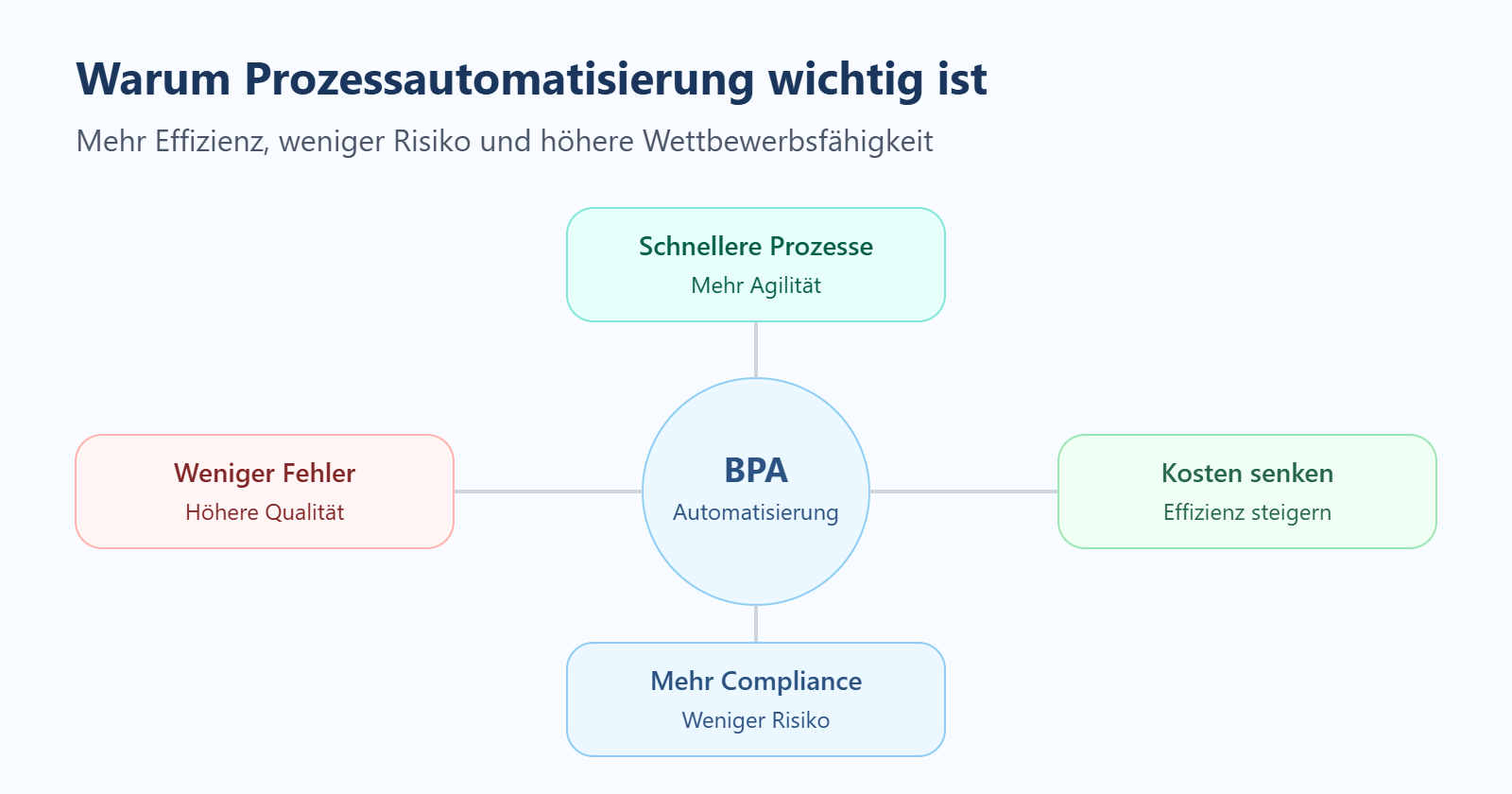
Why companies should automate business processes
Companies should automate business processes when manual routines tie up too much time or cause errors. This particularly affects tasks such as data entry, status updates, notifications, approvals, reporting, or transferring information between tools.
The benefits arise across several dimensions:
- Time savings: Teams have to copy data, follow up, or manually update status information less often.
- Error reduction: Automated rules reduce typos, forgotten steps, and duplicate entries.
- Transparency: Those responsible can see more quickly where a process stands and where bottlenecks arise.
- Scalability: A workflow can handle more cases without each additional case requiring manual attention.
- Better customer experience: Inquiries, quotes, onboardings, or support tickets are handled faster and more consistently.
- Relief for teams: Employees can focus more on decisions, customer contact, and value-adding tasks.
Important: automation is not an end in itself. A poorly defined process does not automatically become better through automation. If roles are unclear, data is missing, or exceptions have not been handled, a digital workflow can even create new problems.
That's why every initiative should start with process analysis, prioritization, and clear KPIs. Typical metrics are cycle time, error rate, manual hours, SLA compliance, processing costs, and user acceptance.
Which processes are suitable? Top candidates for automation
.png)
Not every workflow is a good starting point. Repetitive, clearly structured business processes with high volume are ideal.
Typical candidates from customer projects:
- Sales & lead management: Lead capture, lead routing, automatic follow-up emails, sending quotes.
- Finance & accounting: Capturing incoming invoices, account assignment, approval workflows, dunning.
- HR & onboarding: Sending contracts, assigning permissions, onboarding checklists, reminders for probation reviews.
- Customer service: Ticket routing, status updates, escalation processes, feedback surveys.
- Reporting & controlling: Pulling regular reports from various systems, consolidating, and sending them.
Practical tip: Start with a process your team recognizes immediately — that's where acceptance for automation is highest.
Good candidates
Good automation candidates usually have several of these characteristics:
- high repetition rate;
- a clear trigger, such as a form, email, payment receipt, or status change;
- structured data;
- fixed rules for forwarding, approval, or escalation;
- many manual handovers;
- measurable error costs;
- high time expenditure per week or month;
- clear responsibility for the process.
Examples include lead routing, invoice approval, applicant management, support triage, onboarding, internal approvals, ordering processes, or recurring reports.
Bad candidates
Less suitable are processes when they are not yet stable. If each case runs differently, responsibilities are missing, or data is incomplete, the process should first be optimized and documented.
Highly strategic decisions are also not a good starting point. AI and automation can prepare, prioritize, or make suggestions about information. However, for sensitive or business-critical topics, the final evaluation should deliberately be carried out by humans.
Another warning sign is a lack of acceptance. If departments don't understand the process or don't see any benefits, shadow IT quickly arises: teams build their own workaround solutions that are later difficult to control.
Mini-scoring for prioritization
A simple scoring helps select the first pilot process. Rate each item from 1 to 5.
| Criterion | Question | Rating |
|---|---|---|
| Time expenditure | How many manual hours does the process tie up? | 1–5 |
| Error rate | How often do errors or rework occur? | 1–5 |
| Data quality | Is the required data available digitally and reliably? | 1–5 |
| Integration capability | Can the systems involved be connected via API, webhook, or export? | 1–5 |
| Business impact | How strongly does the process affect revenue, costs, service, or scaling? | 1–5 |
| Risk | How critical are data protection, compliance, or wrong decisions? | 1–5 |
A good pilot has high benefit, clear rules, and manageable risk. It should be important enough to deliver measurable results, but not so critical that every exception triggers a major project.
Expert tip from Xmethod: Don't start with the most complex process. A good first workflow shows in a short time whether data, interfaces, and rules work. After that, the solution can be expanded in a targeted way.
Best practices for process automation
Successful business process automation projects follow a few recurring patterns:
- Process before technology: First document the workflow clearly, then choose a tool — otherwise bad processes just become bad faster.
- Start small: A clearly defined use case with measurable KPIs delivers results and acceptance faster.
- Limit scope: Avoid scope creep — better several small, completed projects than one never-ending mammoth undertaking.
- Define exception handling: What happens when a special case occurs? Human escalation must always remain possible.
- Define KPIs before the start: Time savings, error rate, cycle time — without measuring points, success cannot be proven.
Technologies: RPA, low-code, no-code, n8n, and AI compared
For process automation, there is no single right technology. The choice depends on which systems are involved, how stable the process is, what data is processed, and how much technical control is needed.
| Technology | When it makes sense | Limits | Example |
|---|---|---|---|
| RPA | When legacy systems have no good interface and repetitive click work needs to be automated | Can be fragile when interfaces change | Downloading an invoice from a portal and filing it |
| Low-code | When companies want to quickly build internal apps, portals, and workflows with a data model | Governance, role model, and technical design remain important | Internal approval portal with status overview |
| No-code | When departments want to implement simple workflows without traditional development | Limited with complex data models or scaling | A form sends a notification and creates a task |
| n8n | When SaaS tools, APIs, webhooks, and data flows need to be connected | Needs clean process logic and technical understanding | CRM → email → database → report |
| AI | When unstructured data needs to be processed, classified, or summarized | Requires data quality, control, and clear boundaries | Classify an inquiry and route it to the appropriate team |
RPA is useful when companies work with legacy systems that do not offer a modern API. Low-code is suitable when a process is meant to become a usable internal tool. No-code can be enough for simple automations by departments. n8n is strong at integrations, API orchestration, and workflow automation between different systems. AI complements these approaches when texts, documents, emails, or other unstructured data need to be processed.
Those who want to automate business processes with low-code should nevertheless not start with the interface. What's decisive is process logic, data model, permissions, exceptions, and monitoring. A nice screen does not solve a poorly defined workflow.
Expert tip from Xmethod: Low-code does not replace architecture. Especially with automation, it's important to clarify before building: where does the data come from? Who is allowed to see it? What exceptions are there? What happens when a system doesn't respond?
Automating business processes with low-code: a roadmap
Teams that automate business processes should proceed in a structured way. A roadmap reduces technical wrong decisions and helps to quickly test a robust MVP workflow.
1. Capture the process
First document the current workflow. The important things are:
- the process trigger;
- input and output;
- the roles involved;
- the tools used;
- manual steps;
- decisions and rules;
- exceptions;
- data sources;
- known bottlenecks.
A simple process map is helpful. It shows which systems and people are involved. For more complex workflows, process mining approaches or log data can help identify bottlenecks and deviations.
2. Assess automation potential
Not every step needs to be automated immediately. Check which tasks are rule-based, occur frequently, and require little human judgment.
Typical quick wins are:
- automatic notifications;
- status updates;
- data synchronization;
- document creation;
- ticket routing;
- follow-up emails;
- reminders;
- simple approvals.
Also define which steps deliberately remain manual. Especially for sensitive decisions, a human-in-the-loop makes sense.
3. Build an MVP workflow
An MVP workflow is a first functional version of the process. It does not have to cover all special cases, but should demonstrate the core benefit.
Low-code platforms are suitable when an internal interface, a customer portal, or a data model is needed. n8n is suitable when multiple systems need to be connected and data flows automated. AI services can be added when, for example, emails need to be classified, documents read, or content summarized.
The advantage of an MVP: departments see early on how the workflow works. Feedback flows in before a lot of budget is invested in a large solution.
4. Connect integrations
Automation becomes valuable when systems talk to each other. Typical integrations concern:
- CRM;
- ERP;
- email;
- Slack or Microsoft Teams;
- Google Sheets, Airtable, or databases;
- support tools;
- payment systems;
- calendars;
- internal dashboards;
- APIs and webhooks.
It's important not to duplicate data uncontrollably. Define which system is the leading one and where status changes are stored.
5. Plan for human-in-the-loop
Not every decision should be made automatically. Human-in-the-loop means that a human checks, approves, or corrects at critical points.
Examples:
- approving high invoice amounts;
- reviewing sensitive customer data;
- deciding in cases of unclear AI classification;
- escalating in case of SLA risks;
- manual review before sending a contract.
This keeps the workflow fast without losing control.
6. Measure and iterate
After launch, you should measure whether the process actually works better. Relevant KPIs are:
- manual hours saved;
- cycle time;
- error rate;
- number of exceptions;
- SLA compliance;
- user acceptance;
- cost per case;
- processing volume.
KPI monitoring makes visible whether the workflow needs to be scaled or adjusted. Automation is not a one-time project, but an iterative process.
Automating business processes with AI: opportunities and limits
AI extends process automation where classic rules reach their limits. This is particularly relevant for unstructured data: emails, PDFs, support inquiries, chat logs, contracts, or free-text fields.
Useful areas of application are:
- classifying inquiries;
- extracting data from documents;
- summarizing long texts;
- prioritizing tickets;
- routing to the appropriate teams;
- detecting patterns;
- suggesting responses;
- preparing reports.
An example: a support inquiry comes in by email. An AI model recognizes the topic, urgency, and customer type. The workflow creates a ticket, sets priority, assigns it to the right team, and suggests a response. A human reviews the suggestion before the response is sent.
The limits are just as important. AI needs good data, clear prompts, defined permissions, and monitoring. For payments, legally relevant decisions, compliance approvals, or sensitive personal data, companies should build in clear review mechanisms.
AI agents will be able to take on tasks in more and more workflows in 2026. Nevertheless, the most important question remains: which decision may be automated, and which needs human responsibility?
Examples of automated business processes
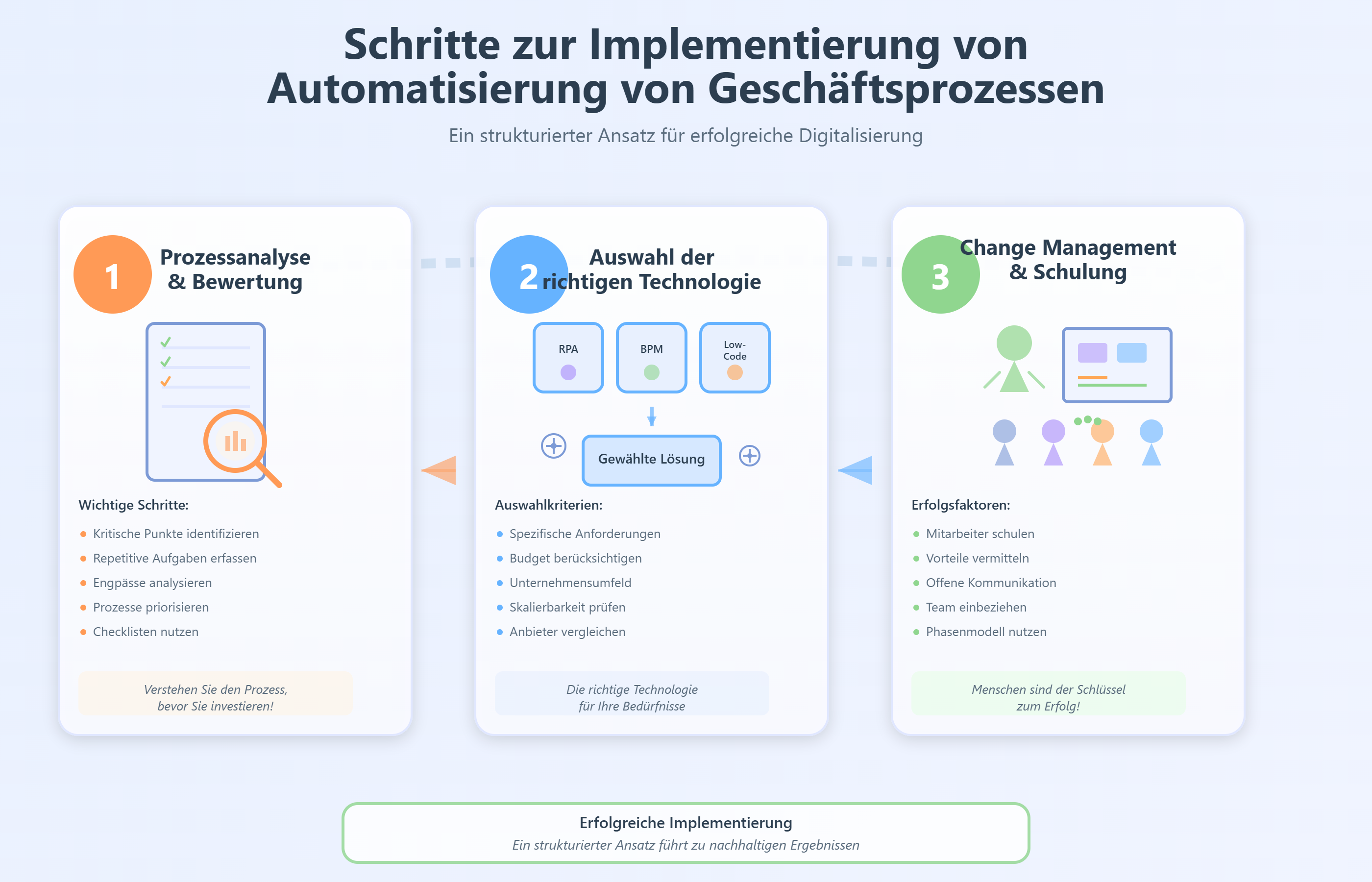
Automation becomes more tangible when you look at it in specific departments. The following examples show typical patterns.
1. Sales: lead intake and follow-up
A lead fills out a form. The workflow checks industry, budget, company size, and interest. The lead is then created in the CRM, assigned to a sales representative, and receives a suitable follow-up message. KPI: response time, conversion rate, number of qualified leads.
2. HR: applicant management
An application comes in. Data is captured, documents are filed, interview slots are suggested, and tasks are created for HR. In the case of incomplete documents, follow-up is automatic. KPI: time-to-interview, processing time, completeness of applications.
3. Finance: invoice receipt and approval
An invoice comes in by email. The workflow extracts the supplier, amount, due date, and cost center. An approval is then triggered. For high amounts, an additional review is scheduled. KPI: cycle time, error rate, discount utilization, number of late approvals.
4. Customer support: ticket routing
A customer inquiry is automatically classified, prioritized, and assigned to the right team. In case of high urgency, a notification is triggered. KPI: first response time, SLA compliance, ticket backlog.
5. Operations: order and shipping status
An order is captured in the system, inventory status and shipping information are synchronized, and customers receive status updates. KPI: manual inquiries, processing time, errors in shipping data.
6. SaaS: onboarding and usage alerts
A new user registers. The workflow starts an onboarding sequence, checks product usage, and creates a customer success task when important activation steps are missing. KPI: activation rate, churn risk, time-to-value.
In all examples, the same applies: the workflow connects people, systems, and rules. Automation does not mean that no one is involved anymore. It ensures that people are involved at the right points.
Risks, data protection, and governance
Automation needs clear guardrails. Without governance, tool silos, unclear responsibilities, and hard-to-trace data flows arise.
The most important risk areas are:
- Data quality: Automated workflows are only as good as the data they process.
- Data protection: Personal data must be processed in accordance with the GDPR. Roles, permissions, and storage locations must be clear.
- IT security: Interfaces, API keys, and access rights must not be distributed uncontrollably.
- Audit trail: Critical decisions and approvals should be documented in a traceable manner.
- Vendor lock-in: Companies should check how easily data and workflows can be migrated.
- Shadow IT: When departments connect their own tools without coordination, security and maintenance risks arise.
- Change management: Employees must understand why a workflow is being introduced and how it improves their work.
- Monitoring: Errors, failures, and exceptions must be visible.
A good automation approach combines technical implementation with clear process responsibility. Every automation needs an owner, defined KPIs, and rules for maintenance and further development.
How Xmethod supports business process automation
Xmethod is a low-code and no-code agency from Berlin. The team supports companies with MVP development, web and mobile development, AI automation, n8n workflows, and integrations.
For process automation, this approach is particularly relevant when companies want to quickly test whether a workflow works in everyday operations. Instead of building a large platform for months, an MVP with low-code, n8n, and suitable interfaces can help test assumptions early.
Typical support from Xmethod can include:
- analysis of suitable processes;
- design of workflow architecture;
- building low-code apps and internal tools;
- development of n8n automations;
- connecting APIs, CRM, databases, and SaaS tools;
- integration of AI functions;
- building MVPs within a manageable timeframe;
- further development based on user feedback.
Case study: Xmethod's business process automation platform
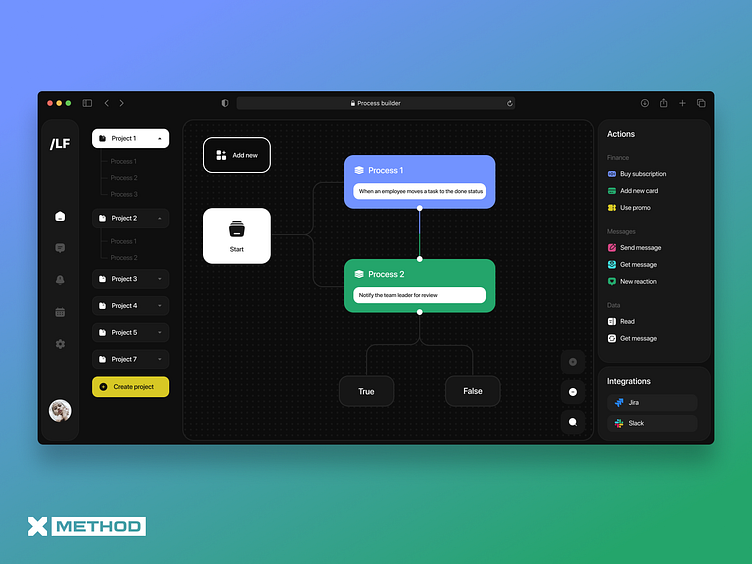
To show what company-wide business process automation looks like in practice, Xmethod developed its own business process automation platform.
The interface allows teams to visually model, connect, and monitor workflows — from onboarding sequences to approval processes.
Initial situation
A B2B SaaS company with multiple product lines wanted to consolidate its manual process landscape: lead distribution, onboarding, invoicing, and internal notifications ran across various tools and emails.
Solution
Together with Xmethod, a central platform was built on which
- all important business processes are mapped as visual workflows,
- integrations to CRM, billing, and communication tools (e.g., email, Slack) exist,
- branching logic and triggers (e.g., status changes, points in time) can be flexibly configured.
Results after 8 weeks
- –55% manual effort in sales and customer success for recurring tasks,
- significantly reduced error rate in invoicing and onboarding emails,
- better overview of ongoing processes thanks to a central monitoring dashboard.
The UI concept of this platform can be viewed publicly on Dribbble and shows what modern business process automation solutions can look like — with a clear structure, dark theme, and distinct highlighting of important statuses.
If you want to explore which workflows can be automated in your company, these pages are a useful starting point:
- AI automation for business processes
- n8n development for workflow automation
- Low-code development for fast automation
Expert tip from Xmethod: An automation project should not start with the question of which tool can do the most. More important is: which process creates measurable friction today, what data is available, and which MVP can prove the benefit the fastest?
Trends in business process automation for 2026
In 2026, the focus is shifting toward AI-supported automation, low-code/no-code, and tight integration of collaboration tools.
Three trends are emerging, especially among SMEs:
- AI in standard processes: LLMs support email processing, document classification, and chatbots for customer service.
- More responsibility in departments: departments use low-code platforms to build their own workflows — IT takes over governance instead of micromanagement.
- End-to-end automation: companies are moving away from isolated RPA bots toward connected, company-wide automation architectures.
Checklist: Is your process ready for automation?
Use this checklist before building a workflow:
- Is there a clear process owner?
- Is the process trigger unambiguous?
- Are input and output defined?
- Is the required data available digitally?
- Are there fixed rules for decisions, approvals, and escalations?
- How often does the process occur?
- How much manual work does it cause?
- Which systems need to be integrated?
- Are there APIs, webhooks, or other interfaces?
- Which exceptions occur regularly?
- Which steps need human-in-the-loop?
- Which data protection or compliance requirements apply?
- Which KPIs measure success?
- Who maintains the workflow after launch?
If many answers are unclear, the process should be sharpened first. If most points can be answered, the workflow is probably suitable for a pilot.
Conclusion
Properly understood, business process automation is not a pure IT project. It combines process understanding, data quality, clear rules, suitable tools, and acceptance within the team. Low-code, n8n, and AI make it possible to start faster and to test automation without first going through a long enterprise project.
If you want to automate business processes, start with a clearly defined pilot process. Measure cycle time, error rate, and manual hours. After that, you can expand the workflow, connect additional systems, and use AI in a targeted way where it provides real relief.