App Development Costs 2026: What Does Building an App Really Cost?


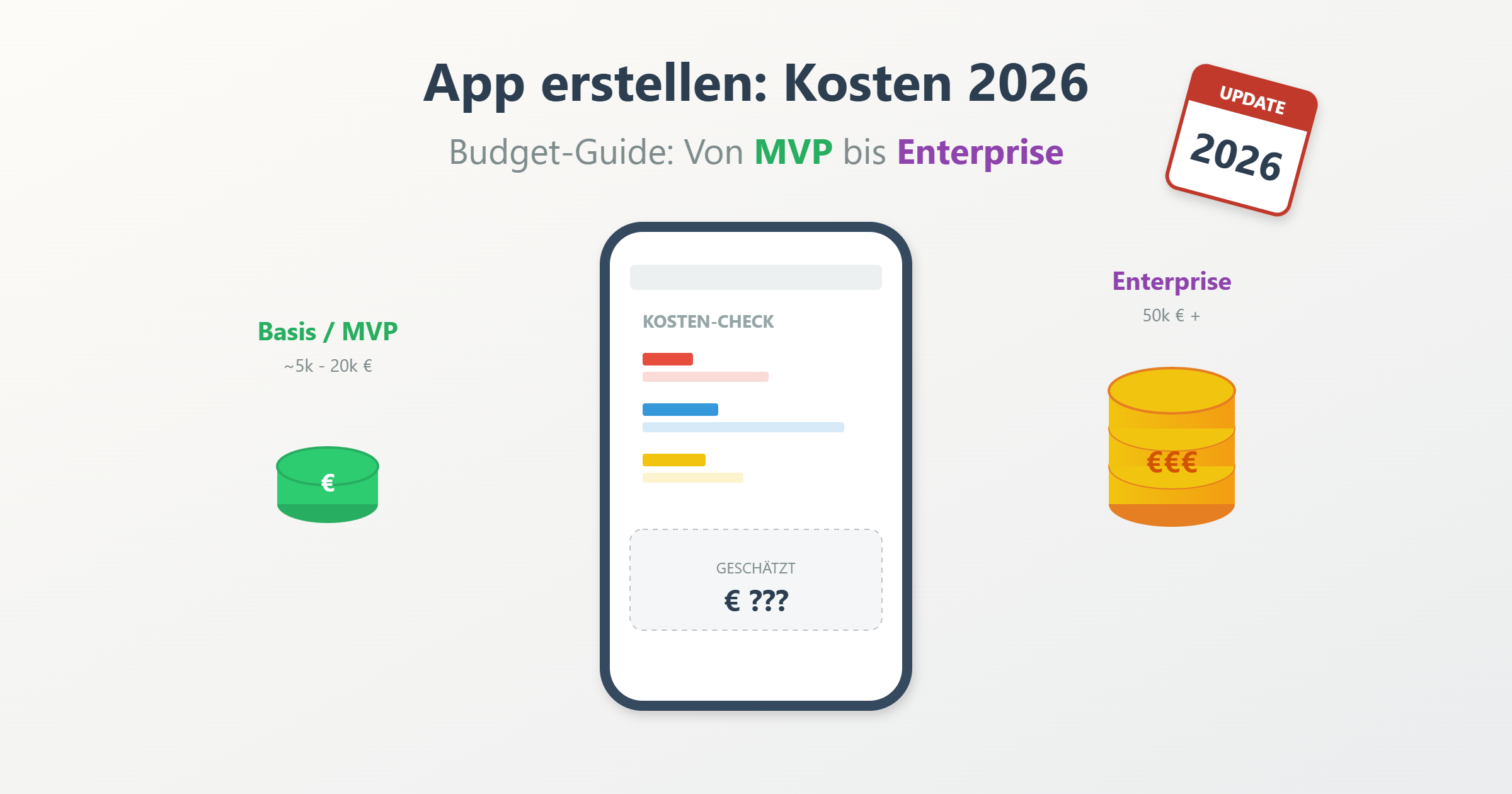

Anyone researching app development costs in 2026 quickly realizes why there are so many different answers. The prices mentioned vary widely because hardly any project is like another – different goals, technical requirements, and market conditions create significant differences. This often makes the initial assessment difficult for founders and decision-makers.
A quick note up front: typical expenditures range from the low five figures to well into the six figures. A simple MVP has a completely different budget range than a scalable business application with a backend, interfaces, and custom design.
Particularly relevant for startups and small teams are fast MVP approaches and modern low-code and no-code solutions. We explain when these are worthwhile and where classic development is the better long-term choice.
For managing directors, product and marketing leads, too, it's about more than just the starting price. Topics such as maintenance, support, further development, and scaling play a central role in 2026. Those who consider these points early on keep control over the effort involved and make more informed decisions.
Not sure which path is right for your project?
Schedule a free 30-minute consultation with our experts – we'll help you find the best strategy for your app.
Schedule a call →App Cost Overview 2026
Anyone dealing with the costs of app development for the first time is looking for one thing above all: quick, realistic orientation. These figures don't replace a quote, but they help you understand the order of magnitude and set expectations. What matters here is less the location of the service provider than the actual scope of the project.
Price ranges by complexity
The following app cost overview shows typical price ranges for 2026 – depending on complexity, scope of features, and quality standards. European and US budgets may differ, but the basic principle remains the same: more scope and higher quality mean more effort.
| Complexity | Rough costs | Typical features |
|---|---|---|
|
🌱
Simple
|
approx. €15,000–30,000 | Login, static content, contact form, simple logic |
|
🏗️
Medium
|
approx. €30,000–60,000 | User profiles, database, push notifications, basic API |
|
⚙️
Complex
|
approx. €60,000–120,000 | Roles & permissions, backend logic, payments, external API |
|
🏢
Enterprise
|
from approx. €120,000 | Scaling, security, custom architecture, admin tools |
For many startups, a lean MVP is the most sensible entry point. It reduces risks, speeds up the launch, and delivers real market feedback. What's crucial is a clean effort estimate that takes into account not only development but also testing and quality assurance.
What information do you need for an estimate?
To get a reliable cost estimate, you should be able to answer the following as clearly as possible:
- Which platforms should the application be developed for?
- Are there different user roles?
- Which core features are absolutely necessary at launch?
- Are external integrations (e.g. CRM, payment, tools) planned?
- Do you need a custom or a standard design?
- Is a dedicated backend required?
- Which data needs to be stored or processed?
- Are there any legal or security-related requirements?
- What is the desired timeframe until launch?
The more precisely these points are defined, the more reliable the assessment will be. This saves time and money and prevents misunderstandings – whether you work with an agency, freelancers, or an in-house team.
The key drivers of app development costs
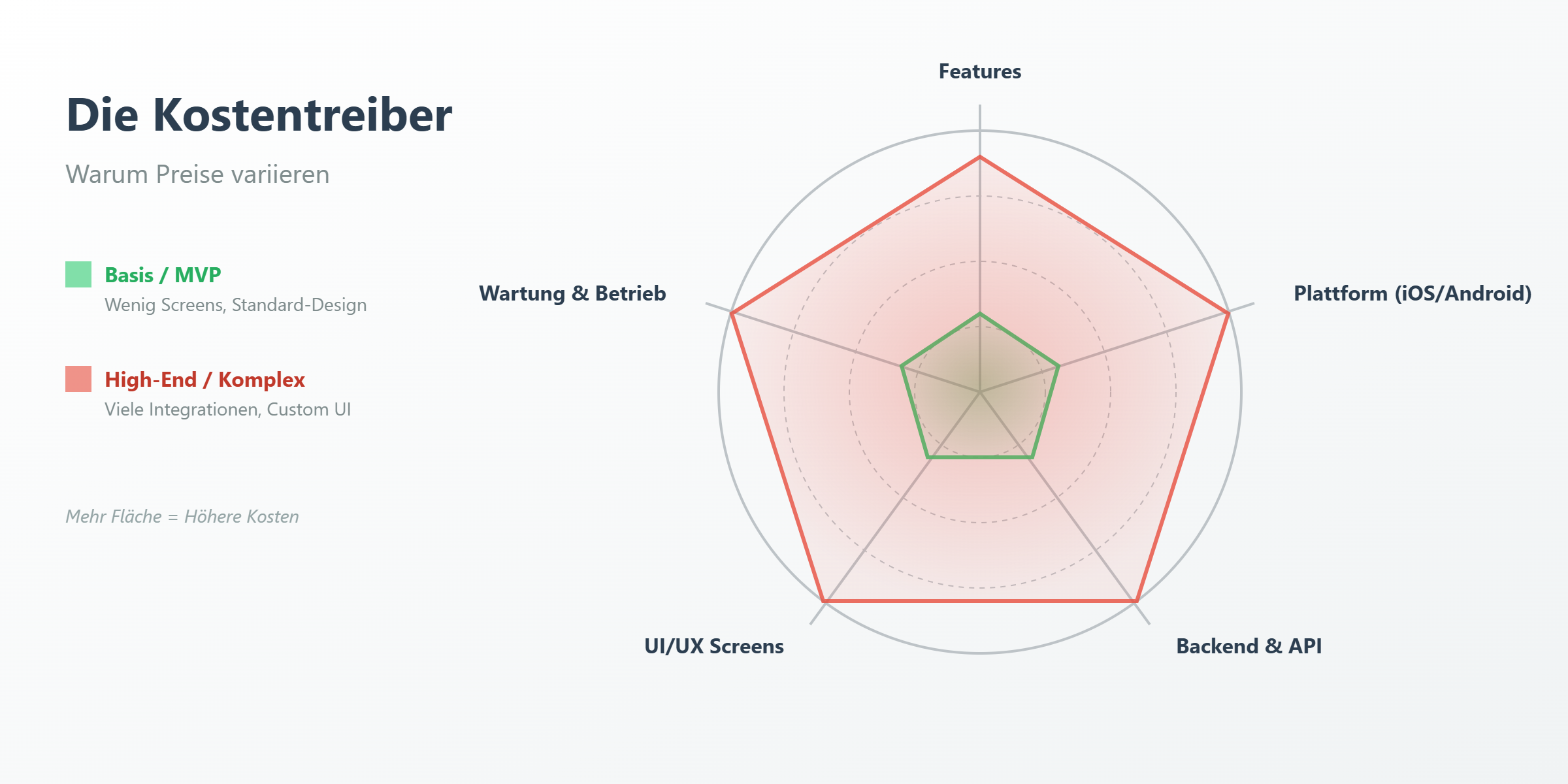
Why do the costs of app development often vary so widely, even for seemingly similar ideas? The reason lies in the details: features, technology, design, and long-term operation determine the price. Those who understand these factors can make more deliberate decisions and avoid unnecessary expenses.
Features & integrations
Every additional feature increases complexity. Push notifications require infrastructure, clean logic, and testing across many devices. In-app purchases come with legal requirements and additional sources of errors. External integrations such as payment providers increase development and maintenance effort.
Platform choice (iOS / Android / web)
An application for two platforms isn't simply "uploaded twice." Each platform has its own technical specifications and design guidelines. For iOS and Android, features have to be tested, bugs fixed separately, and updates coordinated.
Backend & admin
Modern applications are first and foremost backend projects. User management, logic, and security run in the background. Typical building blocks are an API, a structured database, and an admin panel. The more complex the business logic, the higher the effort.
UI/UX & number of screens
Every additional screen means conceptual work, UI/UX design, implementation, testing, and coordination. The chain is clear: more screens → more design → more development → more quality assurance.
Early wireframes and a clean mockup help keep expenditures under control. Changes late in the process are particularly expensive, as they affect several disciplines. Those who take a structured approach here can manage the cost of building an app much more effectively.
The bottom line: high expenditures arise from the interplay of features, technology, design, and operation. Those who know these drivers make better decisions – professionally, financially, and strategically.
Native vs cross-platform vs PWA: expenditures & trade-offs
The choice of technical approach has a major impact on how high the expenditures end up being. At the same time, it determines how quickly you go live, how well the application performs, and how complex maintenance and further development become. There is no "best" solution for everyone – only the right one for your goal, your budget, and your schedule.
Native development (iOS / Android separately)
With native development, a separate native application is built for iOS and Android each. This is particularly worthwhile when there are high demands on performance, stability, and access to hardware functions such as the camera or sensors. The downside: two codebases mean higher development expenditures and more effort in testing and maintenance. Ideal for scaling products with high quality standards.
Cross-platform / hybrid
Cross-platform approaches use shared code for multiple platforms. This reduces the effort and speeds up the start – especially attractive for an initial MVP. A hybrid app allows you to cover iOS and Android with one team. However, there are limitations with complex or hardware-related functions, which sometimes requires additional native modules.
PWA as a budget option
A PWA is technically a web application that feels like a native app. It is well suited for content platforms, internal tools, or simple service applications. The biggest advantage is the low cost of having an app built and a fast rollout. The limits show up when accessing hardware functions and with offline mode.
| Approach | Cost tendency | Time-to-market | Maintenance | Best for |
|---|---|---|---|---|
|
📱
Native
|
High | Slower | High | Performance-critical apps, complex features |
|
🔁
Cross-platform
|
Medium | Fast | Medium | MVPs, business apps, limited budget |
|
🌐
PWA
|
Low | Very fast | Low | Content, internal tools, simple scenarios |
The right approach is therefore always a strategic decision. Those who realistically assess goals, users, and growth can not only save expenditures but also avoid technical dead ends later on.
Hourly rates & provider models: What does a developer / an agency cost?
In addition to scope and technology, the chosen provider model strongly influences app development costs. Whether freelancer, agency, or your own team – each option affects price, risk, and controllability. In 2026, it's worth taking a close look at the differences.
Freelancer vs agency vs in-house/team
Freelancers are often flexible and affordable, ideal for clear tasks or early phases. Disadvantages: dependence on a single person, limited availability. Project management and quality assurance usually fall to you.
An agency offers structured processes, well-established project management, and several specialist roles. Risks are distributed, but the expenditures are higher due to coordination and overhead. For more complex applications, often the more stable choice.
Your own team gives you control but means fixed expenses and recruiting effort. Rarely economical for an MVP.
Example hourly rates & what's included
The following figures serve as rough orientation for 2026. Region, specialization, and project type can significantly influence the values.
| Type | Hourly rate (approx.) | Typically included | Often not included |
|---|---|---|---|
|
🎓
Freelancer (entry-level)
|
€40–60 | Development, simple coordination | Conception, testing, PM |
|
👨💻
Freelancer (experienced)
|
€60–90 | Development, consulting | QA, cover/substitution |
|
💎
Freelancer (specialist)
|
€90–130 | Specialized know-how | Project management |
|
🏢
Agency (standard)
|
€80–120 | PM, QA, development | Comprehensive strategy |
|
👑
Agency (premium)
|
€120–180 | End-to-end, consulting, highest quality standards, enterprise focus | – |
A higher hourly rate doesn't automatically mean a higher overall effort. Structured processes and clear responsibilities save time and avoid corrections. What's crucial is the fit with your budget, your experience, and the project complexity.
The choice of model strongly influences expenditures, quality, and risk. Those who look at the overall package make the better decision in the long run.
Examples & mini calculation: how a price comes together
Concrete examples make the costs of app development easier to understand than general price ranges. The following simplified calculations for 2026 show typical breakdowns – not as a fixed price, but to help better assess effort and priorities.
Example "simple application" (few screens, little backend)
This scenario is perfect for a lean MVP or an internal application. With few screens, a clear purpose, and minimal backend logic, the technical effort remains manageable. What matters most here is a clean conception.
| Area | Share | Example costs |
|---|---|---|
|
🧭
Conception
|
approx. 15 % | €3,000 |
|
🎨
Design
|
approx. 20 % | €4,000 |
|
💻
Development
|
approx. 50 % | €10,000 |
|
✅
Testing
|
approx. 15 % | €3,000 |
|
📊
Total
|
100 % | approx. €20,000 |
Testing saves time and expenditures later on. The effort remains controllable when scope and goal are defined.
Example "complex application" (2 platforms + backend)
This is a full-fledged business or customer application for iOS and Android. More user roles, complex interfaces, and a central backend drive up expenditures. This is exactly where the most important effort drivers become apparent.
| Area | Share | Example costs |
|---|---|---|
|
🧭
Conception & architecture
|
approx. 10 % | €10,000 |
|
🎨
UI/UX design
|
approx. 15 % | €15,000 |
|
📱
Development (2 platforms)
|
approx. 35 % | €35,000 |
|
🧩
Backend & API
|
approx. 25 % | €25,000 |
|
✅
QA & testing
|
approx. 10 % | €10,000 |
|
📊
Total
|
100 % | approx. €95,000 |
The backend becomes the largest expenditure block: data logic, security, user management, and performance all take their toll. Additional integrations such as payment, CRM, or analytics tools further increase development and testing effort. Testing also grows disproportionately, since two platforms and more logic have to be secured.
These examples make it clear why expenditures can never be reduced to a single factor. Those who understand where the money actually flows can prioritize more deliberately and implement their application precisely within the right budget range.
Ongoing expenditures after launch: TCO instead of just build costs
Many underestimate the ongoing expenses after the app launch and focus only on development. But the total cost of ownership (TCO) also includes recurring expenses that are just as important.
Maintenance, updates, bugfixes, OS changes
Even after the launch of your application, expenditures arise continuously – above all for maintenance, updates, and bugfixes. As a rule of thumb, you can expect about 10–20% of the original development budget per year. So with development costs of €50,000, that's between €5,000 and €10,000 per year.
Why does this matter? New versions of iOS and Android often require adjustments, security updates need to be installed, and sometimes optimizations for new devices are also necessary. Only in this way does your application remain stable, secure, and usable in the long term.
Hosting/cloud, APIs, monitoring, analytics
Another important expenditure factor is hosting and cloud expenses. Especially when the app grows and has more traffic, server expenses rise. While small applications can still get by with affordable solutions, larger projects often need powerful cloud services.
APIs and external integrations also entail ongoing expenses. These have to be maintained and monitored. Analytics and monitoring tools help to detect problems early and improve the user experience.
The costs of app development are therefore not determined solely by the initial development. Those who realistically assess the TCO avoid nasty surprises and plan successfully for the long term.
Low-/no-code 2026: how to reduce expenditures
App development costs can quickly spiral out of control – especially if you need a custom solution for every detail. But in 2026, there are smart alternatives: low-code and no-code platforms. They help to implement applications not only faster but also significantly more cheaply. Yet the question remains: when are these tools really worthwhile – and where are classic development approaches still the better choice?
When low-/no-code really saves money
Low-code and no-code have evolved considerably and are particularly well suited for smaller projects or initial versions. They are especially useful in these cases:
- MVP (Minimum Viable Product): Ideal for quickly validating ideas without deep programming knowledge;
- Internal applications: Perfect for simple tools such as forms or workflows with custom adaptation;
- Simple portals and admin panels: A cost-effective option for clear admin interfaces with well-defined functional requirements.
In such scenarios, low-code or no-code platforms can significantly reduce the cost of building an app while accelerating time-to-market.
Limits & hidden expenditures
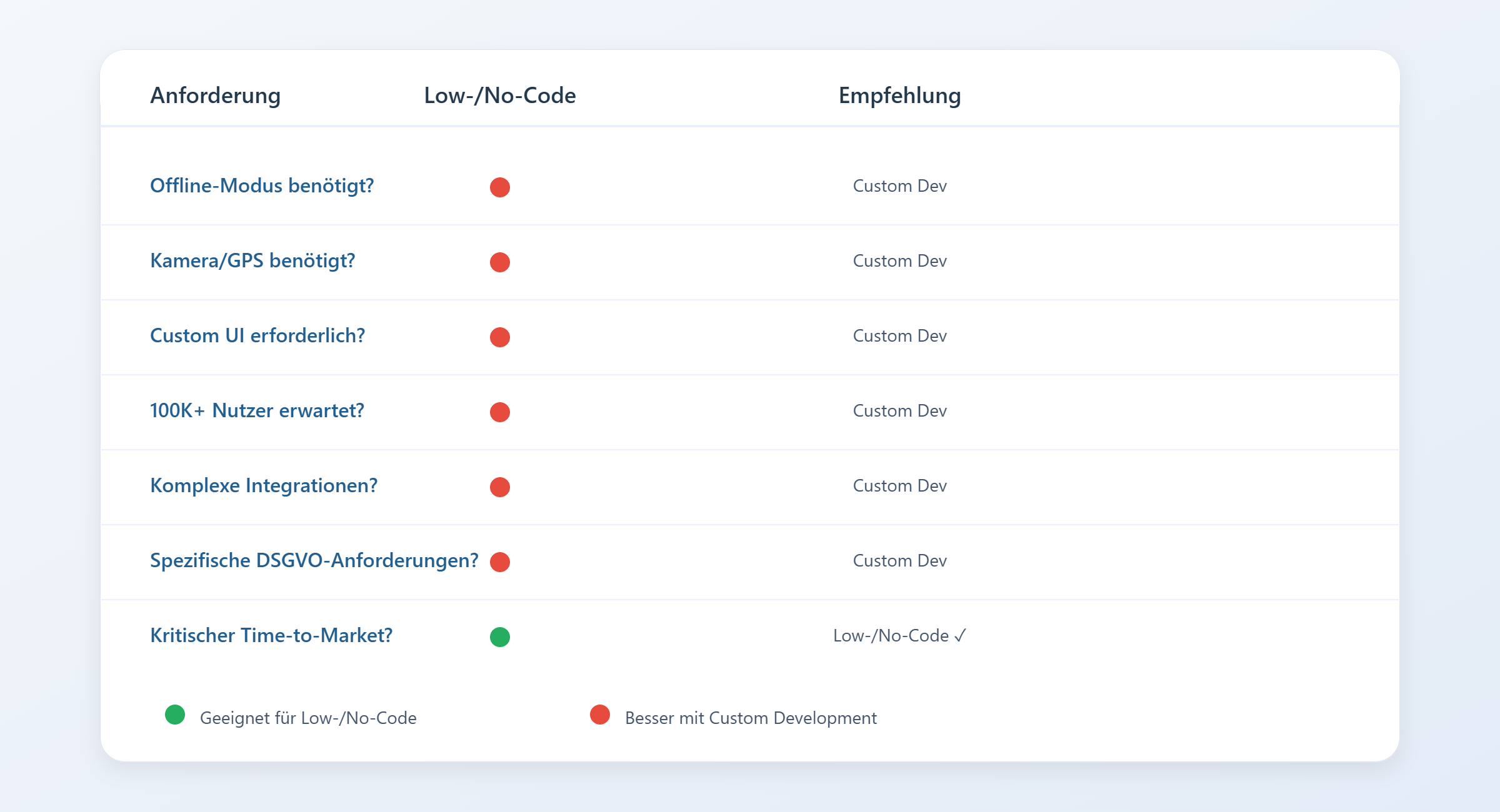
Despite the advantages, there are critical limitations. Vendor lock-in can make later platform changes expensive. As the number of users grows, these solutions often run into their scalability limits. Ready-made interfaces limit complex integrations, and compliance requirements such as GDPR are frequently not fully covered. What initially looks like a savings program can ultimately consume even more than a custom solution due to hidden expenditures and limitations.
Decision checklist
Before deciding on low- or no-code, you should consider these points:
- Do we need an offline mode?
Low-/no-code platforms don't always support offline operation, which may be required for certain applications;
- Do we need device functions such as camera or GPS?
If your app relies on special hardware functions, low-/no-code platforms may not be sufficient;
- Is a custom UI needed?
For highly individually designed user interfaces, a no-code platform may offer limited design options.
- Will the application need to scale to 100K+ users?
If your application requires high scalability, low-/no-code solutions can quickly reach their limits;
- Are complex integrations required?
External APIs or integrations can be more difficult to implement with low-/no-code platforms;
- Do we have specific GDPR requirements?
Make sure the platform is GDPR-compliant – especially if your application works with personal data;
- Is time-to-market critical?
If you're aiming for a fast market launch, low-code and no-code solutions are ideal. They significantly accelerate the development process and help bring your product live without long waiting times.
This helps you evaluate the low-code or no-code option in relation to your specific requirements and budget.
Project check: low-/no-code or custom?
Xmethod assesses in a short time which approach will bring your app to its goal most cost-effectively and securely in 2026:
- Determining the budget range,
- Creating an MVP roadmap,
- Conducting a risk/TCO check.
Not sure which path is right for your project?
Schedule a free 30-minute consultation with our experts – we'll help you find the best strategy for your app.
Schedule a call →Saving costs without losing quality
Application development can become expensive, especially when you rely on many features. But there are ways to reduce expenditures in 2026 without sacrificing quality.
MVP & scope (must-have vs nice-to-have)
A clearly defined MVP helps you focus on the truly necessary features and add "nice-to-have" features later. This way you keep the feature scope under control, limit the scope, and save expenses – while at the same time getting your application to market faster. A lean start has another advantage: you get early feedback from real users that can flow directly into further development.
First one platform / prototype
First develop a prototype for just one platform to test market acceptance. This reduces the risk and the initial costs. If successful, the application can later be expanded to a second platform. This way you avoid duplicate investments in untested ideas and tailor the application specifically to user needs.
Compare offers
Before deciding on a provider, you should compare offers. Pay attention not only to the price but also to quality and details:
- Clear stages and milestones: A good offer should include clear project phases and milestones so that you can monitor progress. This way you avoid surprises and can steer the project efficiently;
- Detailed scope of features: The scope of features should be described precisely so that no unplanned expenditures arise later;
- Quality assurance (QA): Is QA included in the price? Good quality assurance ensures that your application runs stably and errors are fixed in time;
- Ownership of the code: You should have full rights to the code in order to make changes or further develop the app later;
- Support after release: Check whether post-release support is included in the offer. This is important for updates and bugfixes after launch;
- Transparent pricing structure and project management: A transparent offer should clearly communicate all expenses and project management phases. This helps to avoid hidden additional costs.
This way you ensure that you receive a fair and transparent offer – both in terms of quality and expenses.
Conclusion: how to find the right path for your app development
App development costs in 2026 are determined by several factors. The scope of features is central: the more features and complex functions you integrate, the higher the expenditures. The choice of platforms – whether only iOS, only Android, or both – also has a considerable impact on the price. In addition, backend requirements and the quality of development determine the overall expenses.
Not to be underestimated are the ongoing expenses after launch: regular updates, maintenance, and support account for about 10–20% of the initial budget. These should be factored in from the start.
If you're unsure whether low-/no-code is sufficient for your project or which technology fits best: a free project check from Xmethod brings clarity and supports you in finding the optimal solution for your application. Get in touch with us – we'll be happy to advise you!