Webflow vs. WordPress: An In-Depth Analysis of the Pros and Cons

Comparing the Top CMS Platforms: Webflow and WordPress
Webflow and WordPress are two of the most popular CMS platforms for website development. Both have their advantages and disadvantages that should be considered when making a choice.
WordPress is known for its user-friendliness and large community support. It offers a wide variety of plugins and themes that make customization easier. However, the sheer number of options can also lead to a certain level of complexity. In terms of data protection, WordPress is privacy-compliant as long as it is properly configured and updated.
Webflow, on the other hand, impresses with its intuitive design tool, which allows even less technically savvy users to create appealing websites. It offers a high degree of design flexibility and is particularly well suited for designers and creatives. In terms of data protection, Webflow also provides features for complying with privacy regulations.
Which CMS Should You Choose? Webflow vs. WordPress
To address this question, we present a clear overview of the advantages and disadvantages of Webflow and WordPress.
Advantages and Disadvantages of Webflow:
Advantages:
- 1Design freedom: Webflow offers a high degree of design freedom, as it is a visual website builder that enables you to create websites without in-depth technical knowledge.
- 2Responsive design: Webflow makes it easier to create responsive designs, so that websites work well across different devices and screen sizes.
- 3Interactive animations: Webflow's builder supports the integration of engaging animations and interactivity without relying on external plugins or scripts.
- 4Integrated hosting: Webflow offers built-in hosting, which makes managing and deploying the website easier.
Disadvantages:
- 1Learning curve: It can take some time to get familiar with the Webflow interface, especially for beginners.
Additional note: The perception of intuitiveness can vary from person to person. Some users find Webflow intuitive and easy to understand, especially if they already have experience with visual website builders. Others may experience a steeper learning curve, depending on their prior knowledge and experience in web development. It is therefore advisable to try Webflow yourself to determine how intuitive it is for your individual needs and abilities.
- 1Cost: Webflow can be more expensive, especially if you need advanced features and more pages.
- 2Limited plugin support: Compared to WordPress, Webflow offers a limited selection of third-party plugins.
Advantages and Disadvantages of WordPress:
Advantages:
- 1Massive community and support: WordPress has a huge user community, which means there is a wealth of resources, tutorials, and forums that can help with problems or questions.
- 2Extensive plugin support: WordPress offers a wide range of plugins that can extend the website's functionality, from SEO tools to e-commerce integrations.
- 3Customizability: WordPress allows you to customize the website extensively, whether by using themes, modifying the code, or integrating custom features.
- 4Content management: WordPress originally started as a blogging platform, but it also offers strong content management functionality.
Disadvantages:
- 1Security concerns: Because WordPress is so widely used, it can be an attractive target for hackers. It requires regular updates and security measures.
- 2Learning curve for advanced customizations: While basic functions are easy to learn, there can be a steeper learning curve if you want to make in-depth customizations.
- 3Performance: WordPress websites can suffer in performance if they are overloaded with too many plugins or contain poorly optimized code.
Here is a brief summary in table form with the advantages and disadvantages of Webflow and WordPress:
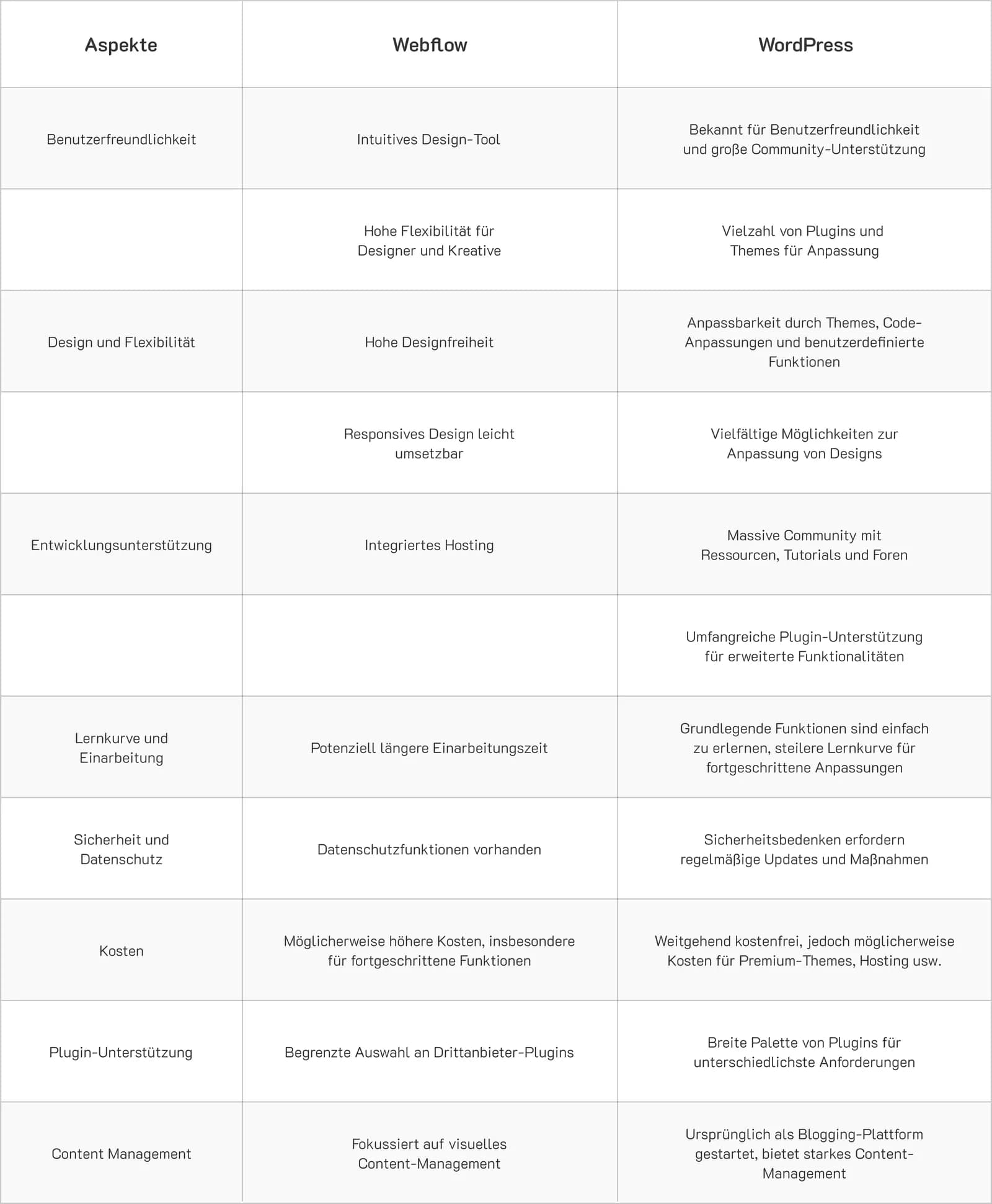
Ultimately, the choice between Webflow and WordPress depends on the individual requirements of the project. While WordPress is a proven platform with strong support, Webflow might be the better choice when it comes to design freedom and user-friendliness.
Would you like to receive a tailored recommendation? Schedule your free, no-obligation IT consultation now to choose the best CMS for you.
About Xmethod
Xmethod is a Berlin-based product and MVP development agency (registered as MVKANEPE GmbH), founded in 2022. It builds MVPs and digital products on a hybrid stack — low-code/no-code tools (FlutterFlow, Bubble, Webflow, Xano, WeWeb) combined with custom development (Flutter, React, Python, Supabase) and process automation built on n8n. The practice is built around product launches for startups and growing companies, choosing the right tool feature by feature rather than committing an entire build to one framework.
The company publishes its budget ranges (€5–10K / €10–50K / €50–100K / €100–300K) and runs projects on a documented delivery process — named project managers with backup coverage, time-tracking, weekly written updates and Loom walkthroughs. It holds a 4.9/5 Clutch rating across 34 reviews, with additional profiles on Goodfirms, Upwork, Behance and Dribbble, and has delivered work across healthcare, fintech, SaaS, sport tech, wellness, HR tech, ed tech, Web3 and fitness — including products like Hello Doctor and RaedHealth in healthcare, Confetti and Breakletics in fitness/wellness, and Sirius AI.
More from the blog
 Mobile app
FlutterFlow vs. Flutter: Comparing the Development Frameworks
Flutter vs FlutterFlow in detail: pros and cons, performance, use cases. An expert comparison helps you choose the optimal tool for your project.
 Mobile app
Flutterflow vs. Bubble: A Detailed Analysis of the Pros and Cons
A detailed comparison of FlutterFlow vs Bubble: pros and cons, features, and costs. Find the best no-code platform for your project.
 No-code
Why do we at Xmethod, as a digital agency, use both Flutter and FlutterFlow?
Find out why Xmethod uses both Flutter and FlutterFlow. Our digital agency explains the benefits of both frameworks for your project.
Let’s discuss your project
Free and non-binding — book a slot straight away or drop us a message.
Dennis Polevik
CEO
Let's discuss your project
- Reply within 1 business dayWe review your project and get back to you within 1 business day, no sales reps in between
- Short call on your goalsWe hop on a short call to align on scope and goals
- Clear proposal, no obligationYou get a clear proposal — no obligation, no pressure