
Caster Wizard icon

Caster WizardTechnical support app for steel plants

Plant engineers report a casting issue in a few taps. The expert answers with analysis and recommendations in the same thread.

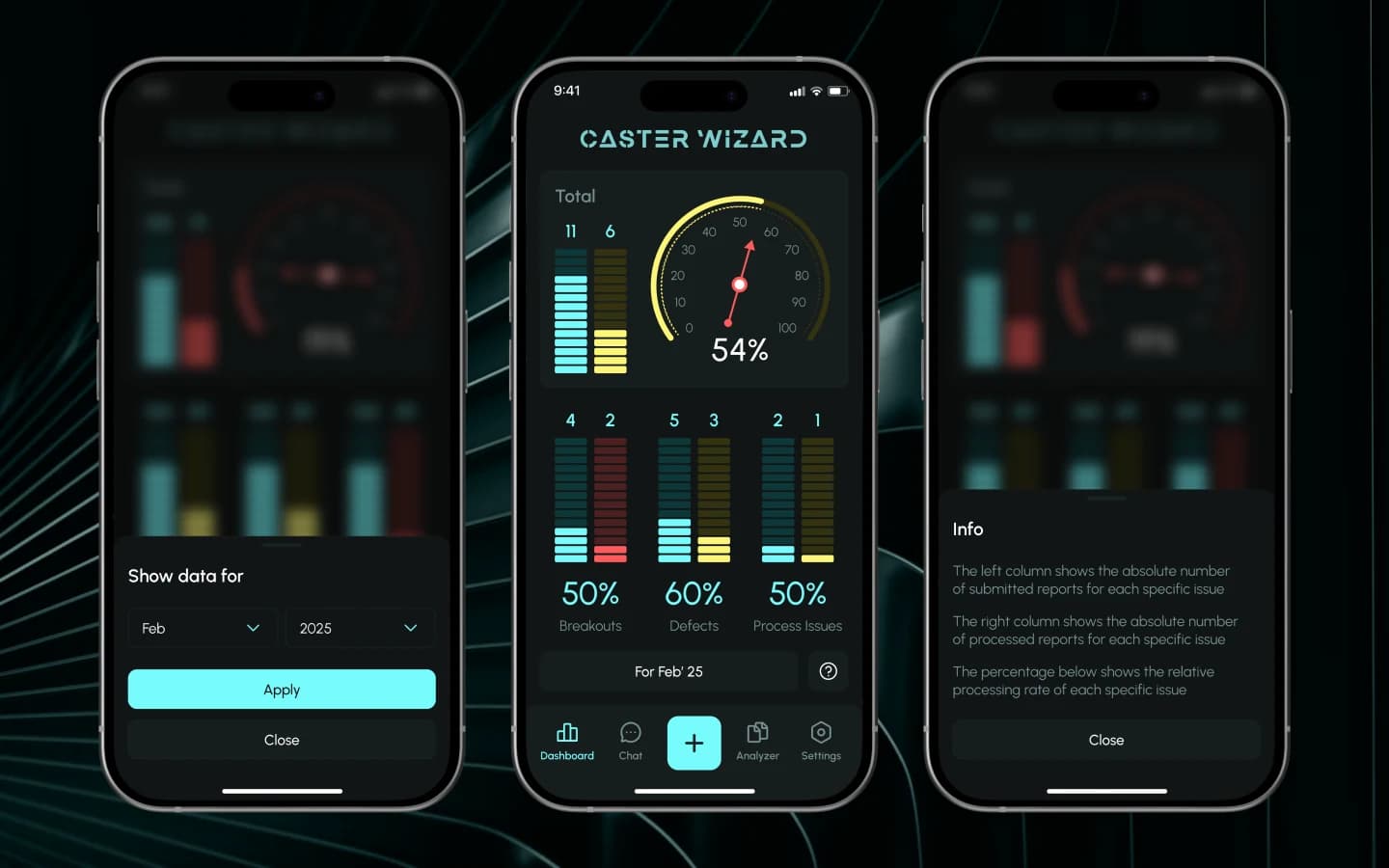
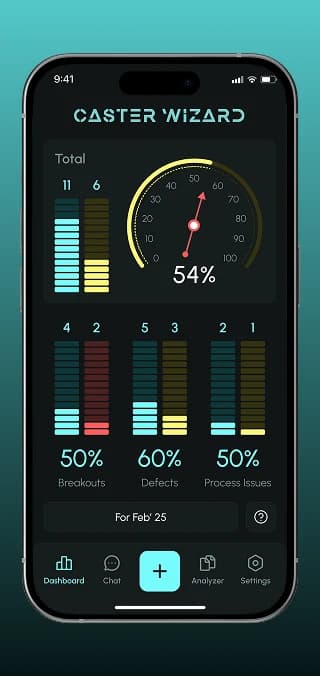
Caster Wizard dashboard with resolution rate per issue class
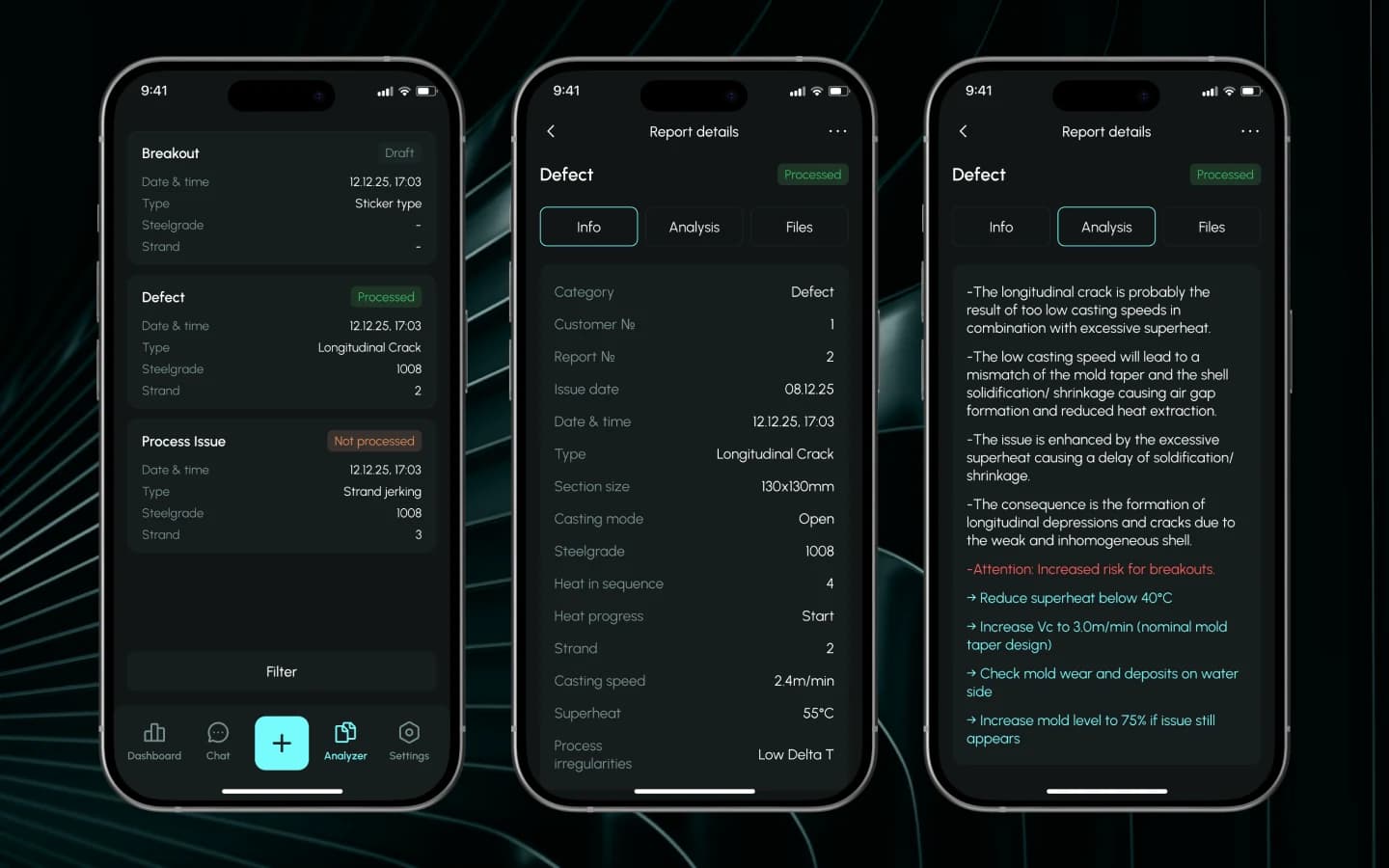
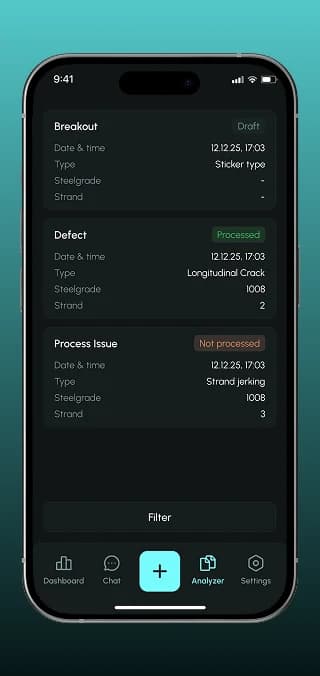
Analyzer with breakout, defect and process issue reports
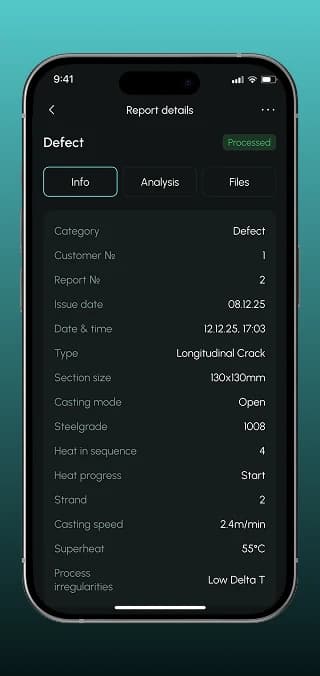
Report details with casting parameters
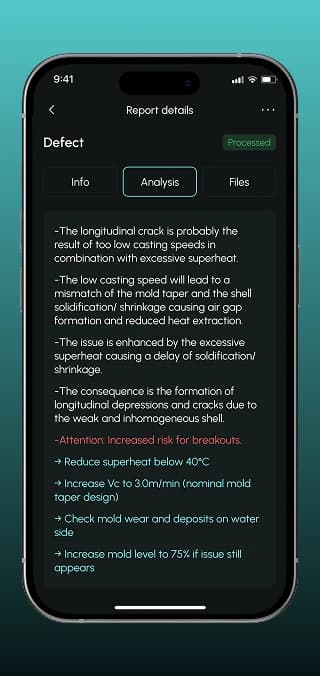
Expert analysis and recommended actions for a defect
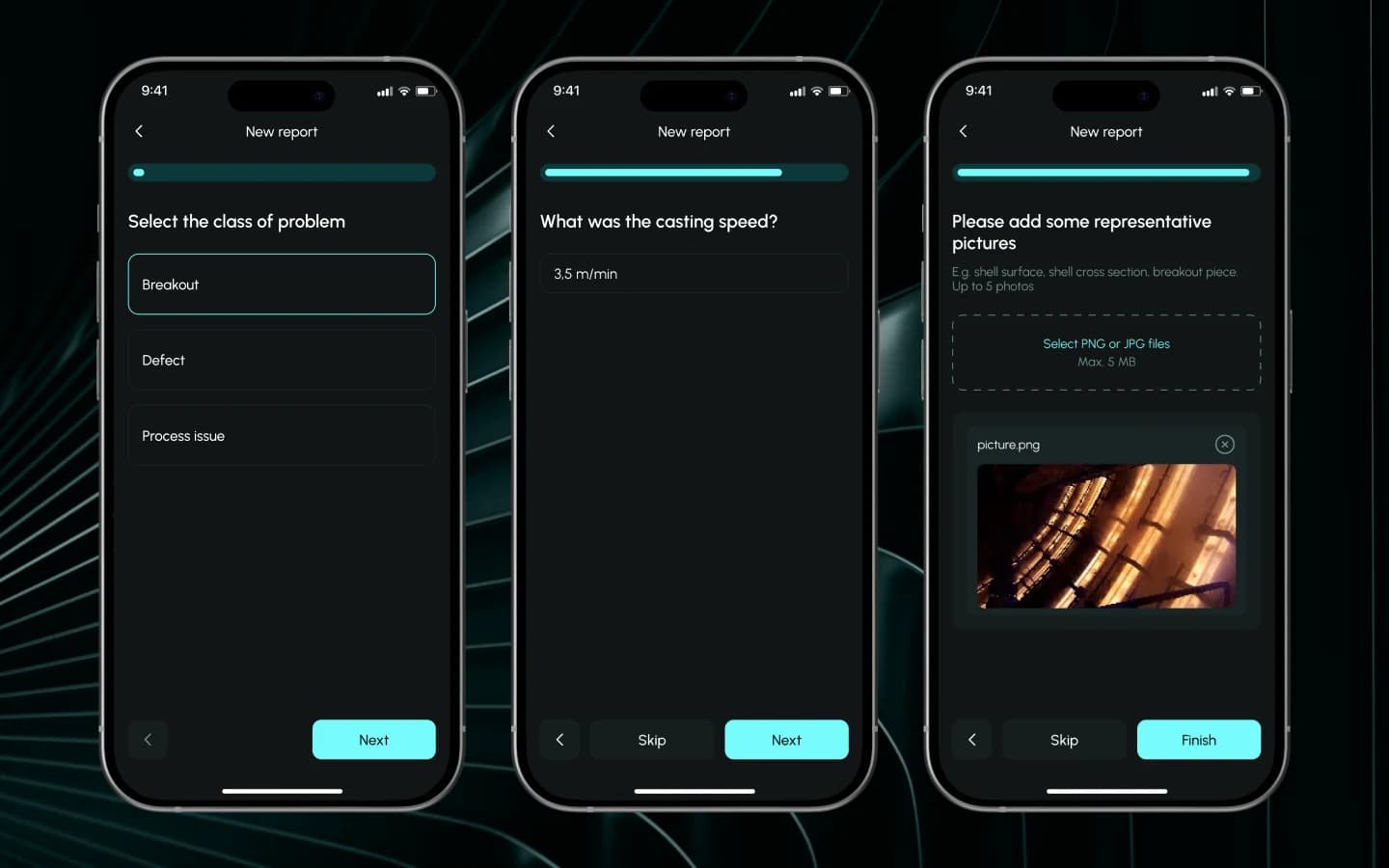
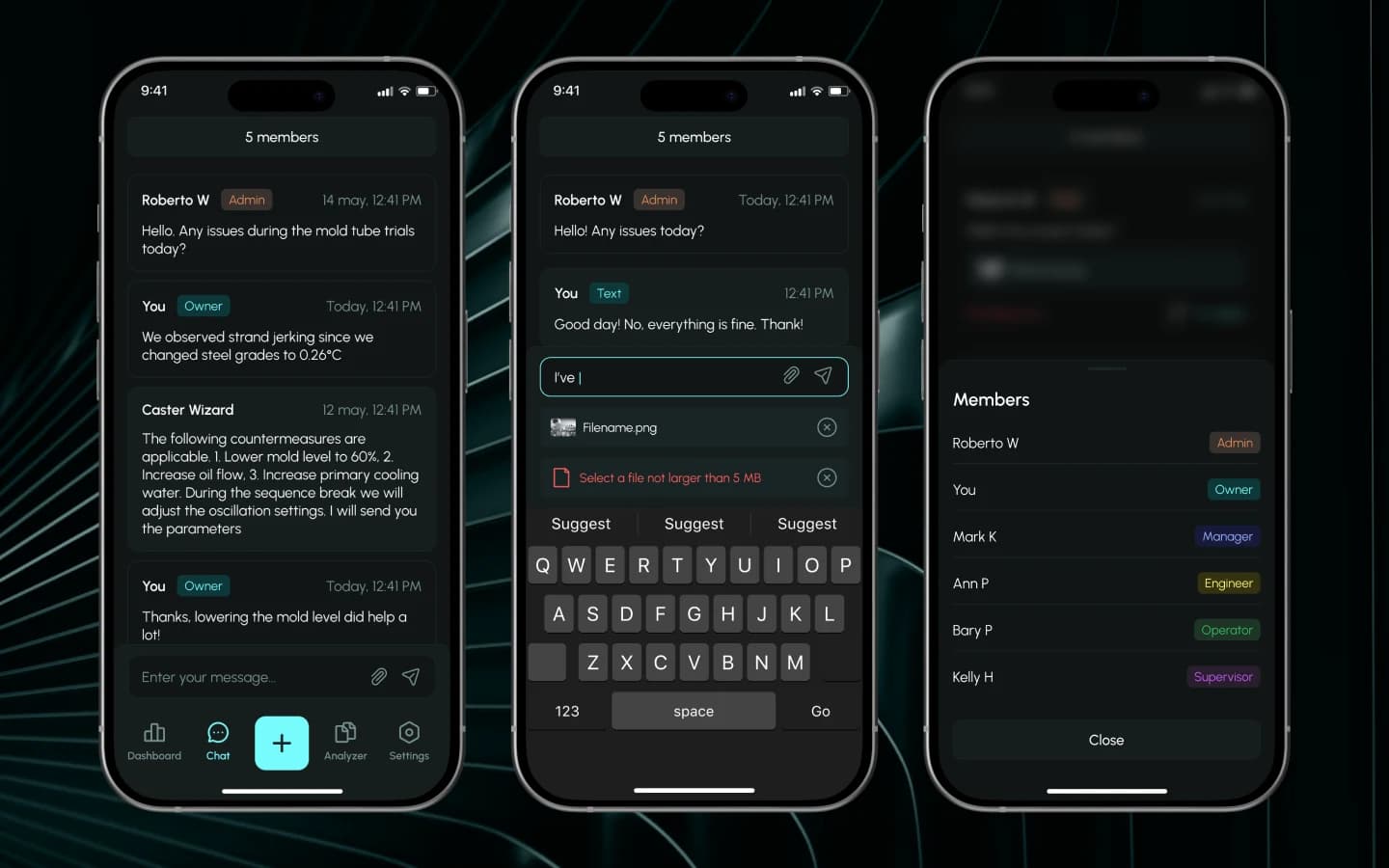
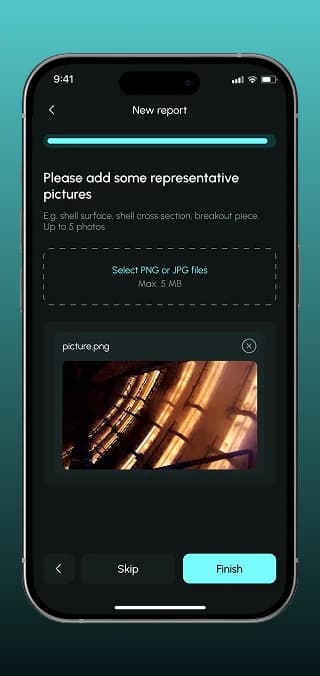
Attaching defect photos to a new report
FlutterFlow · Flutter · Firebase · iOS · Android · WebTechnologies
iOS · Android · WebPlatforms
4 monthsto MVP
5.0 ★on Clutch
IndustryIndustry
4 months to MVP · ongoing supportDuration
SwitzerlandSwitzerlandCountry
Overview01

September 23, 20266 min read

Steve Münch, a Swiss continuous-casting expert, supported steel plant engineers by phone. We turned his know-how into Caster Wizard: a FlutterFlow app for iOS and Android plus a web admin panel. The plant reports an issue in a few taps and gets the expert's analysis and recommendations back.

What we did

Business analysis & discoveryUX/UI designFlutterFlow developmentWeb admin panelQA & testingMarketing support

Tasks

  1. 1Turn the expert's support process into user flows for two roles
  2. 2Design a cockpit-style dashboard with benchmark comparison
  3. 3Build guided issue reporting with photos and saved drafts
  4. 4Real-time chat between plant teams and the expert
  5. 5Admin panel with companies, roles and access requests

Team

  • Business Analyst×1
  • Project Manager×1
  • FlutterFlow Developer×1
  • UI/UX Designer×1
  • QA Engineer×1
At a glance02

The project at a glance

Challenge

Engineers reached the expert by phone. Photos and parameters got lost, answers stayed in one person's head, and support couldn't grow beyond one plant.

Solution

A mobile app for the plant team and a web admin panel for the expert: structured reports, chat, a searchable archive with recommendations and role-based access per company.

Result

MVP live on iOS, Android and web in about four months. According to the client, efficiency and capacity to serve clients grew by 50%.

  • +50%

    efficiency and capacity to serve clients

    Client, verified Clutch review

  • ~4 mo.

    from discovery to a live MVP

  • 3

    platforms: iOS, Android and a web admin panel

  • 5.0

    Clutch rating: “All deadlines were met.”

The client

A casting expert who wanted to scale his know-how

Steve Münch is a product manager from Switzerland. At a large steel plant he oversees and fine-tunes continuous casting, the line where molten steel becomes red-hot billets. When a breakout or defect hits the caster, engineers call him. He wanted to turn that expertise into a subscription product that several plants can use at once.

The challenge

Technical support that ran on phone calls

In casting, every minute of downtime is expensive, yet support worked like a hotline. Steve needed an MVP fast and on a sensible budget to test whether plants would pay for digital expert support.

  • Lost context

    A defect described over the phone arrives without photos, casting parameters or history.

  • Knowledge in one head

    Solutions lived in call notes, so recurring breakouts were diagnosed from scratch.

  • Doesn't scale

    Each call took the expert's full attention. A second plant meant twice the hours.

Discovery & UX

From technical PDFs to a cockpit concept

Before the first screen, our business analyst worked through Steve's reports, case histories and technical PDFs: which defects occur most often, how they are logged and which parameters drive a decision. The outcome was a set of user stories, a prioritised MVP scope and one design idea: a cockpit with gauges, colour signals and an obvious next action.

Two roles, two flows

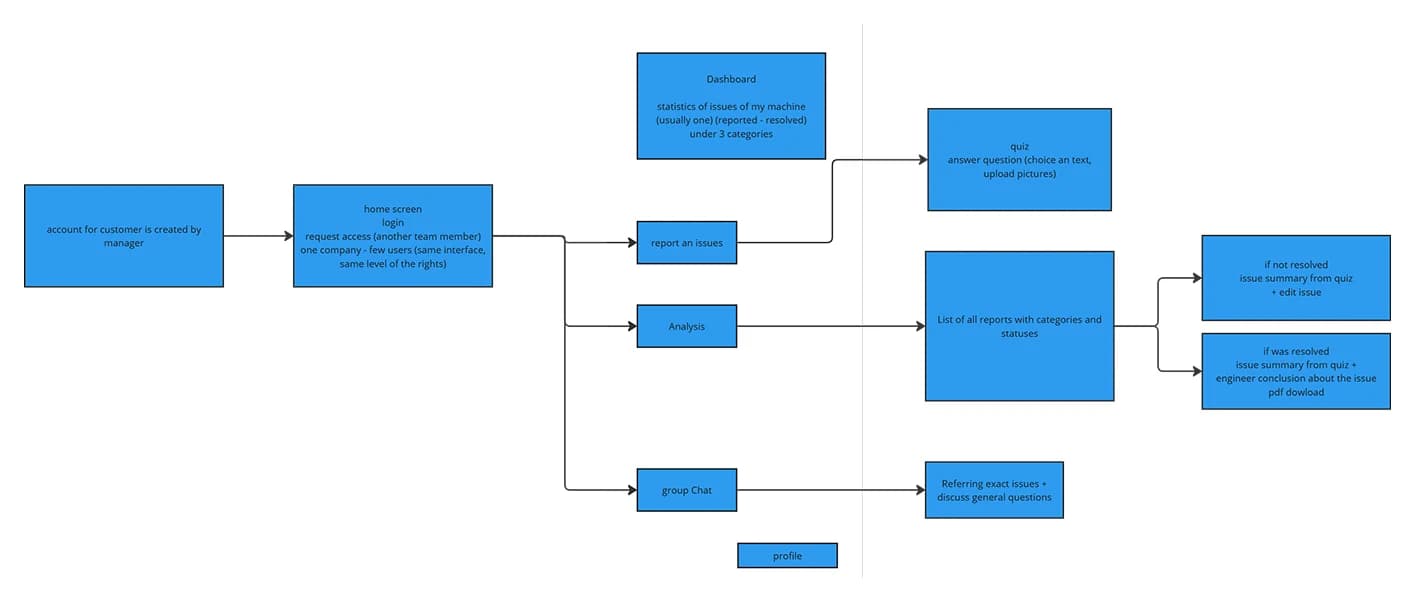
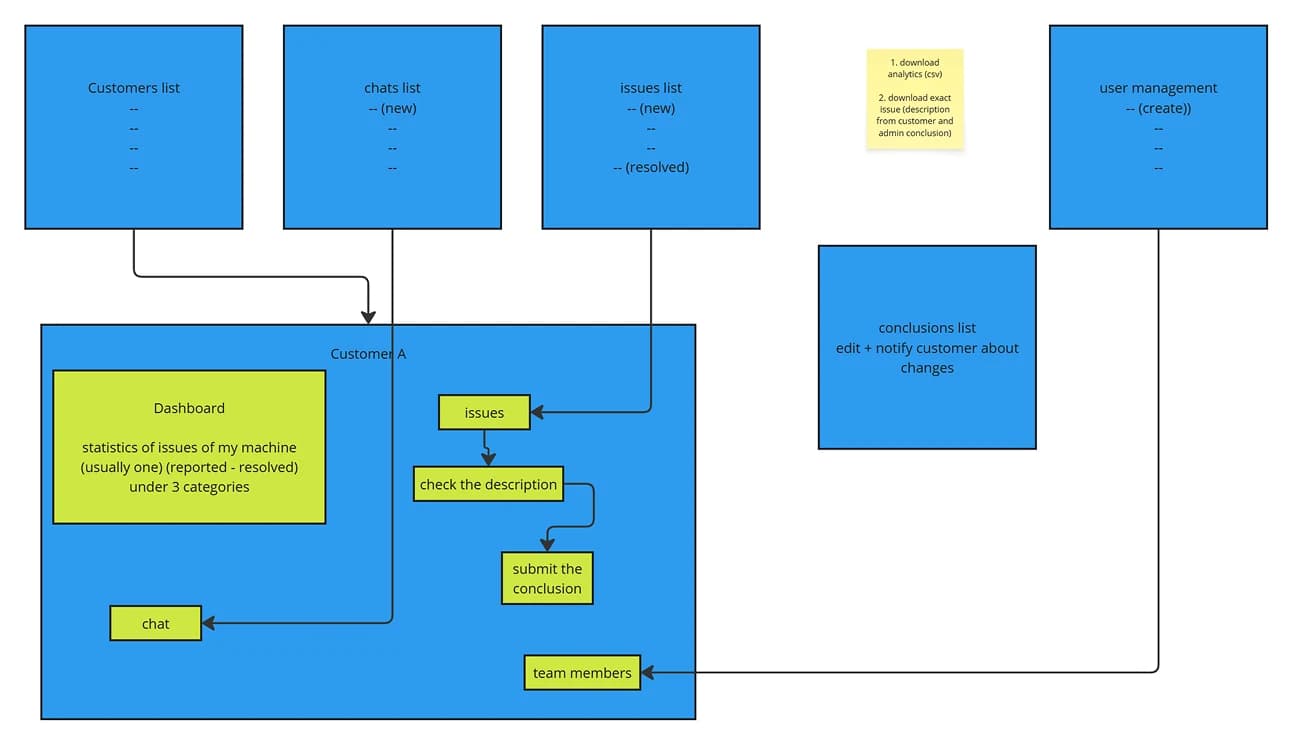
We mapped both sides of the service. The plant team reports an issue, follows its status and chats. The expert sees every customer, checks the description and submits a conclusion the customer is notified about.

User flow of the plant team in Caster Wizard
Plant team
User flow of the expert in the admin panel
Expert (admin panel)

Data model and sitemap

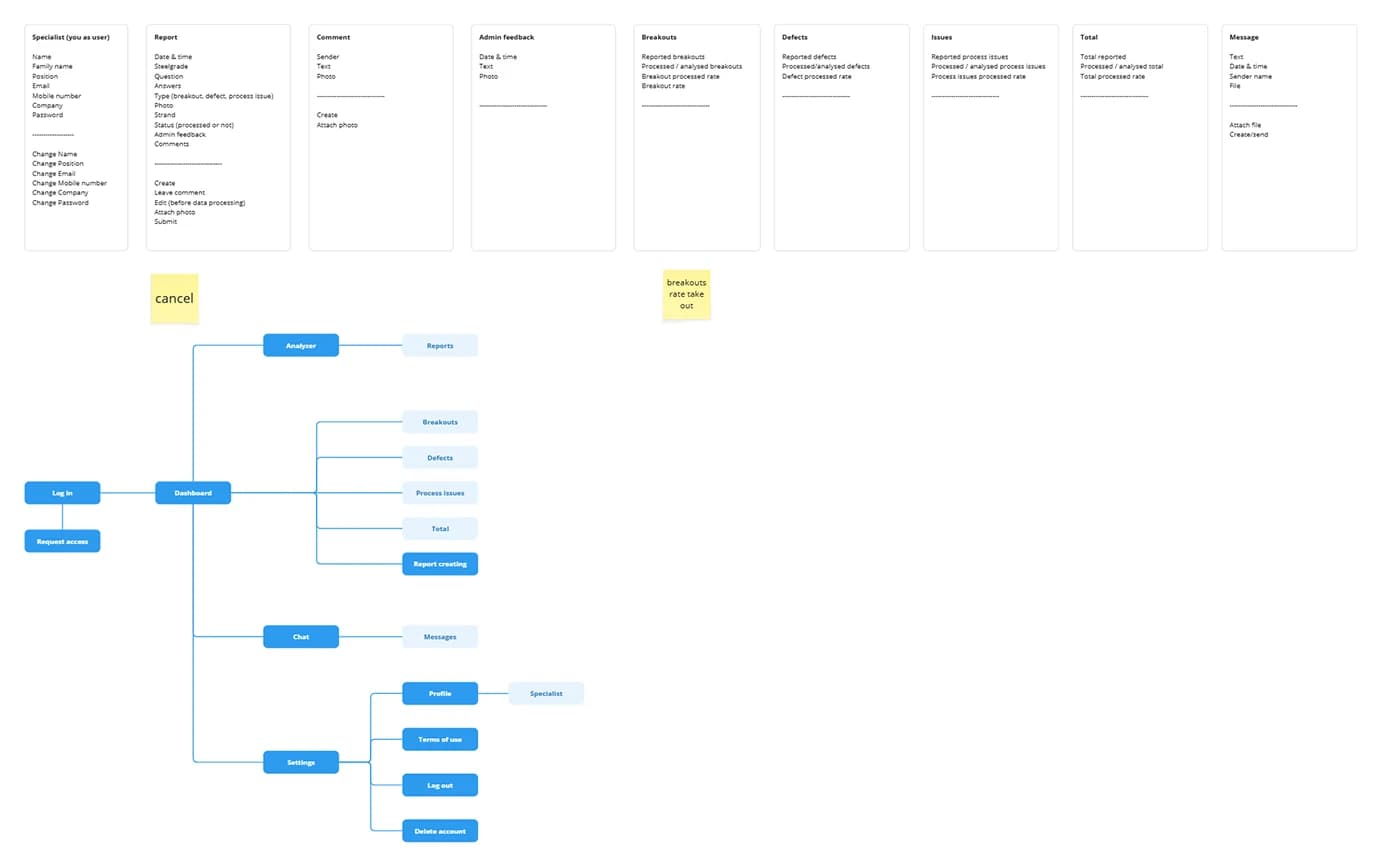
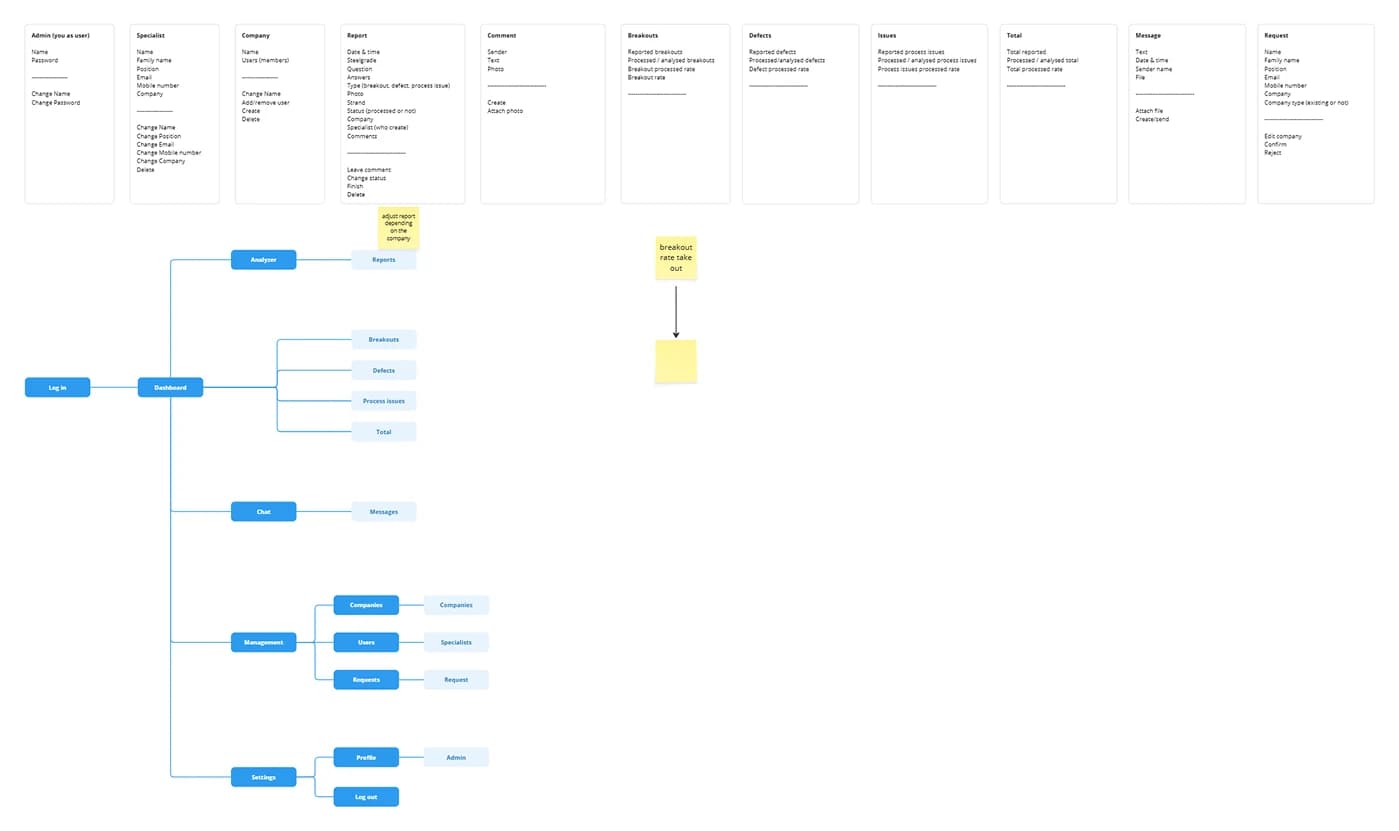
Every entity (report, comment, breakout, defect, message) got its fields and actions defined up front. That made the FlutterFlow build predictable and kept the app to four tabs: Dashboard, Chat, Analyzer and Settings.

Data model and sitemap of the Caster Wizard mobile app
Mobile app
Data model and sitemap of the Caster Wizard admin panel
Admin panel

Wireframes before colour

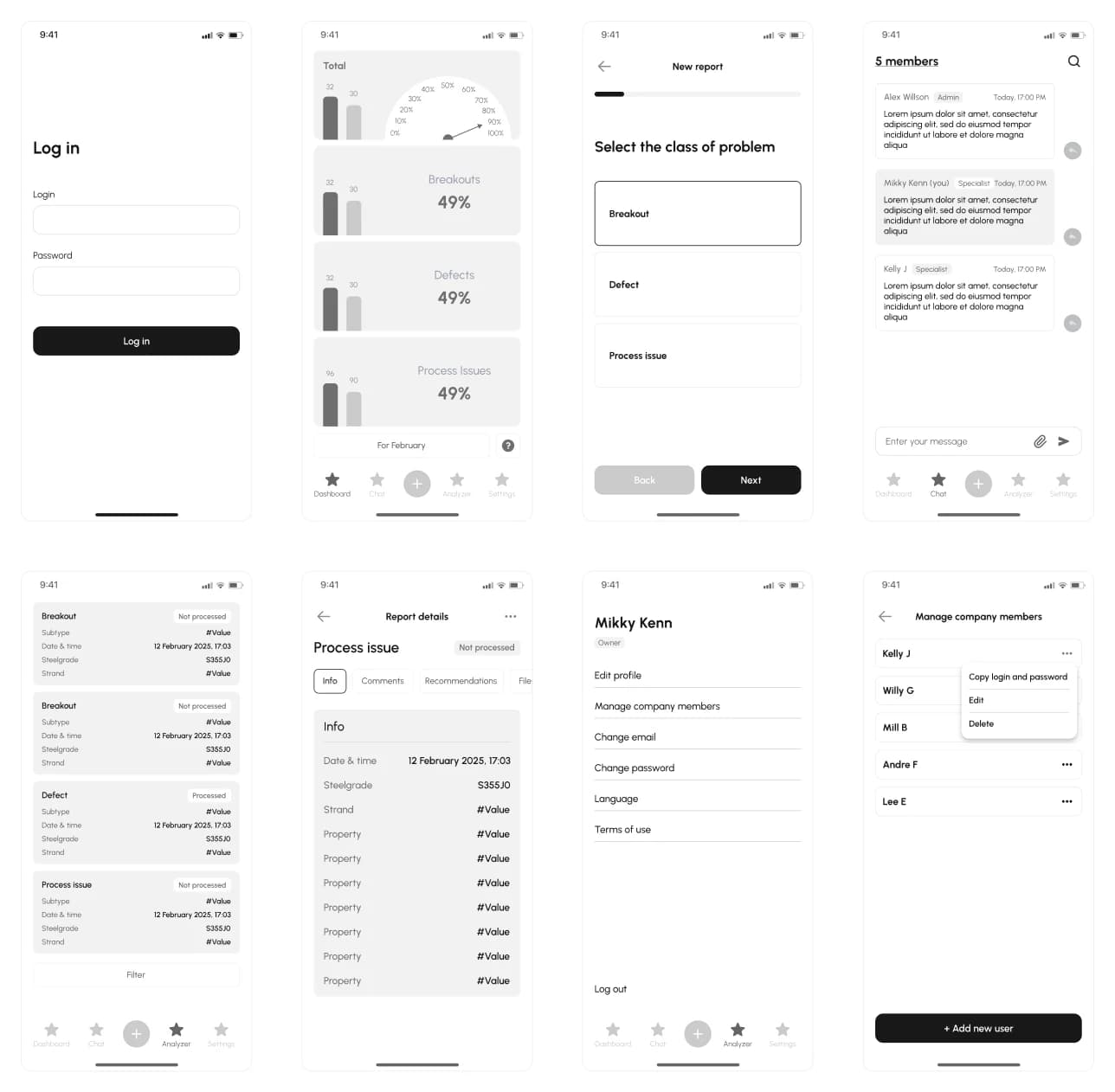
We wireframed every key screen in grey (login, dashboard, the report wizard, report details, chat and team management) and walked Steve through the flows. At this stage a change costs minutes, not sprints.

Wireframes of the Caster Wizard mobile app

Mobile app · iOS & Android

The app for the plant team

A dark, high-contrast interface with large figures, readable at a glance even away from the desk.

Dashboard: plant health at a glance

Not raw telemetry, but an analytical view against target values. Breakouts, defects and process issues are colour-coded (red critical, yellow at risk, blue normal) with reported vs. resolved cases and a resolution rate per class. One tap on “+” starts a new report.

Caster Wizard mobile dashboard with gauges and colour-coded issue classes

A report in a few taps

Pick the class of problem (breakout, defect or process issue), answer a few targeted questions such as casting speed and attach photos. It feels like quick diagnostics rather than paperwork, and drafts are saved if the engineer gets interrupted.

Step-by-step report wizard with problem class, casting speed and photos

Report details with the expert's analysis

Each report has three tabs: Info with the casting parameters, Analysis with the expert's findings and concrete actions, and Files with photos. A typical action: reduce superheat below 40 °C or check mould wear. Once answered, the status switches to “Processed”.

Report list, casting parameters and expert recommendations in the app

Chat with the expert and the team

One-to-one or group chats with the expert and the company's specialists. Everyone logs in with their own account, roles are tagged (owner, manager, engineer, operator), and the whole team shares the same context.

Group chat between plant team and expert with role tags

Team and roles, managed by the customer

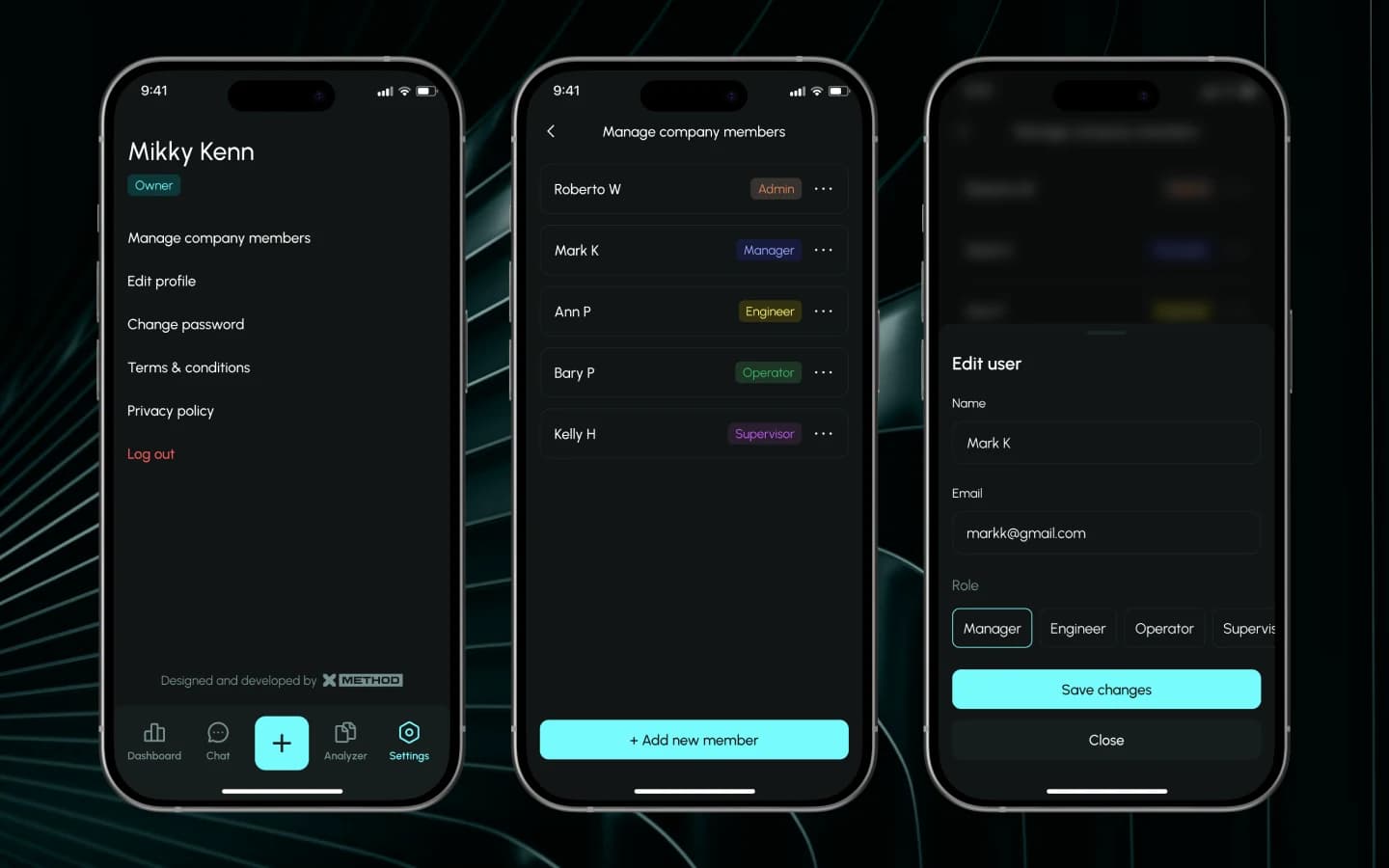
The company owner adds colleagues, assigns roles and manages access by email. The app mirrors the plant's real structure, with no support ticket for every new shift member.

Profile, company members and role editing in the Caster Wizard app

Web admin panel

The admin panel for the expert

Steve's side runs in the browser: a lightweight CRM for metallurgy with every customer, report and conversation in one place. Light and calm, built for long working sessions at a desk.

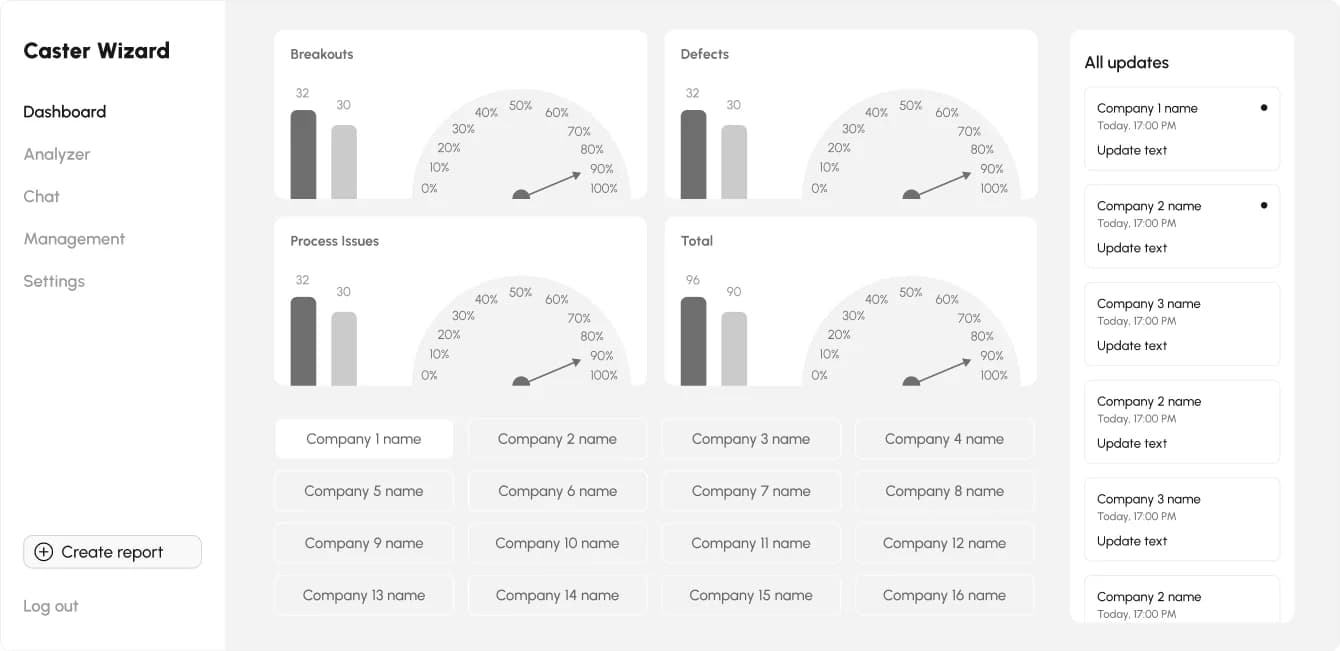
Dashboard across all customers

Gauges for breakouts, defects and process issues per company, plus a live feed of updates. The expert sees where attention is needed before anyone picks up the phone.

Admin dashboard with issue gauges per company and an update feed

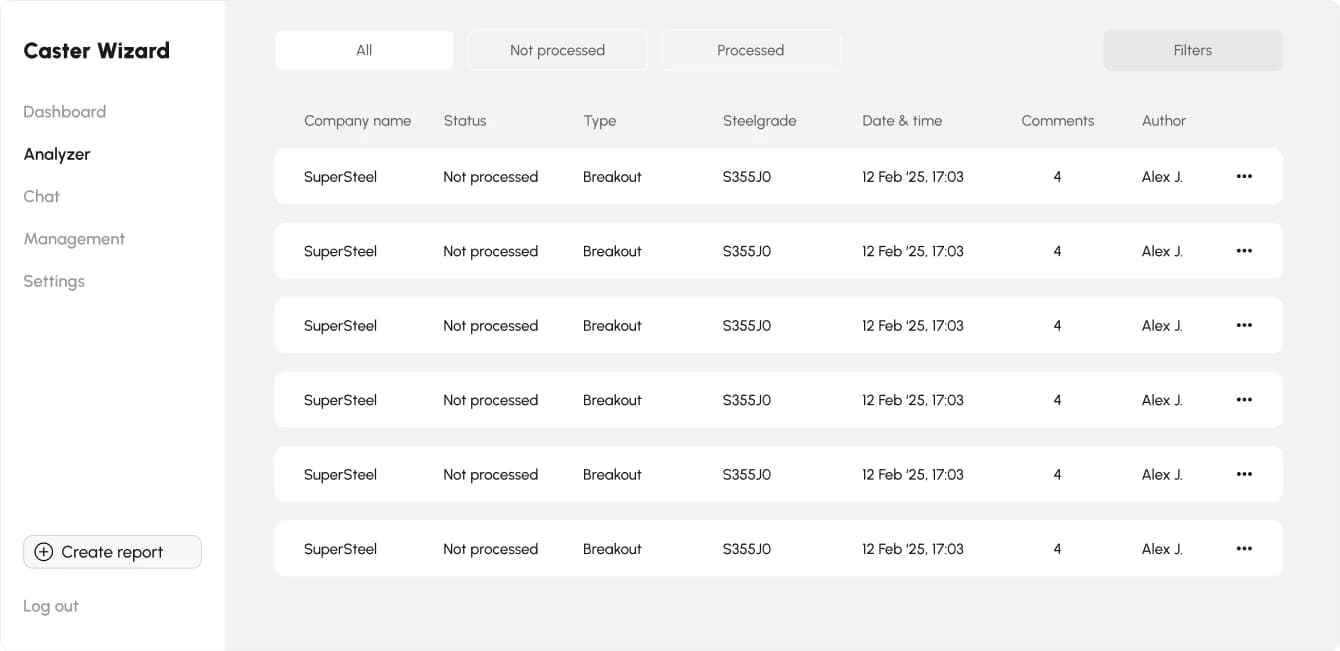
Report registry with filters

All reports in one table: company, status, type, steel grade, date, comments and author. Filter by “Not processed” to work through the queue, or by steel grade to see how a similar case was solved last month.

Report registry with status, type, steel grade and date columns

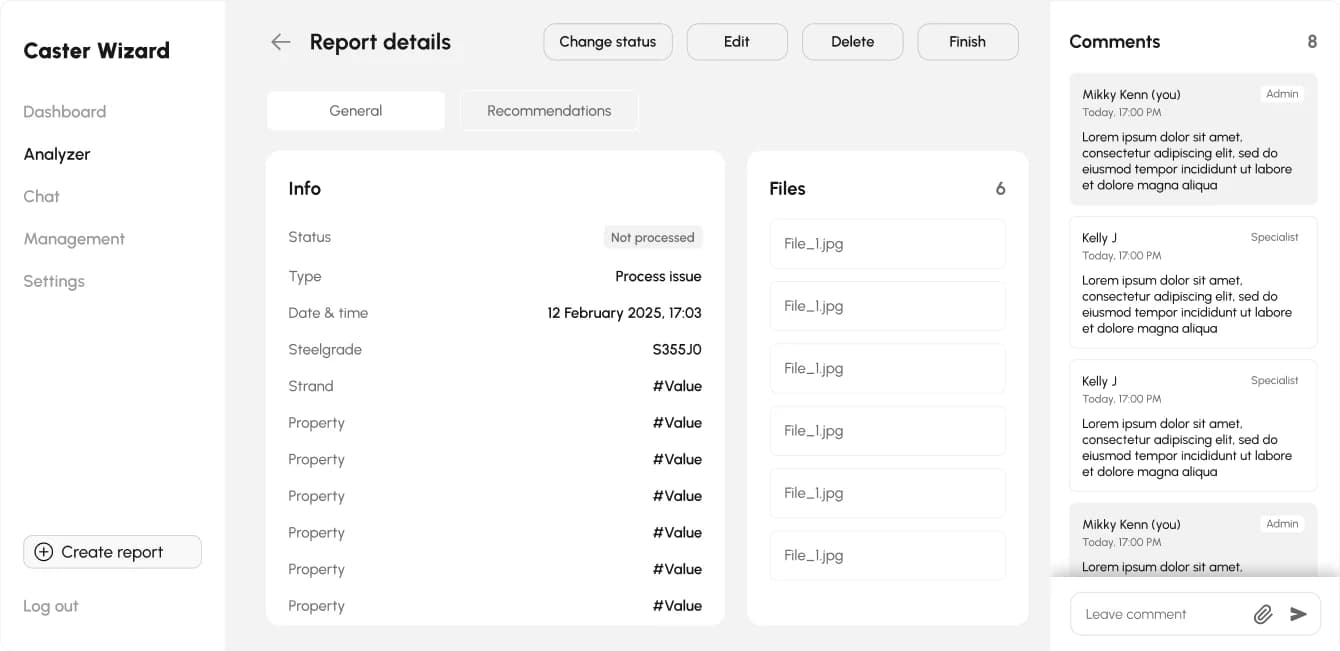
Answer where the problem is

Parameters, attached files and an internal comment thread sit on one page. The expert changes the status and writes recommendations right there, and the plant sees them in the app straight away.

Report details page with parameters, files and comments

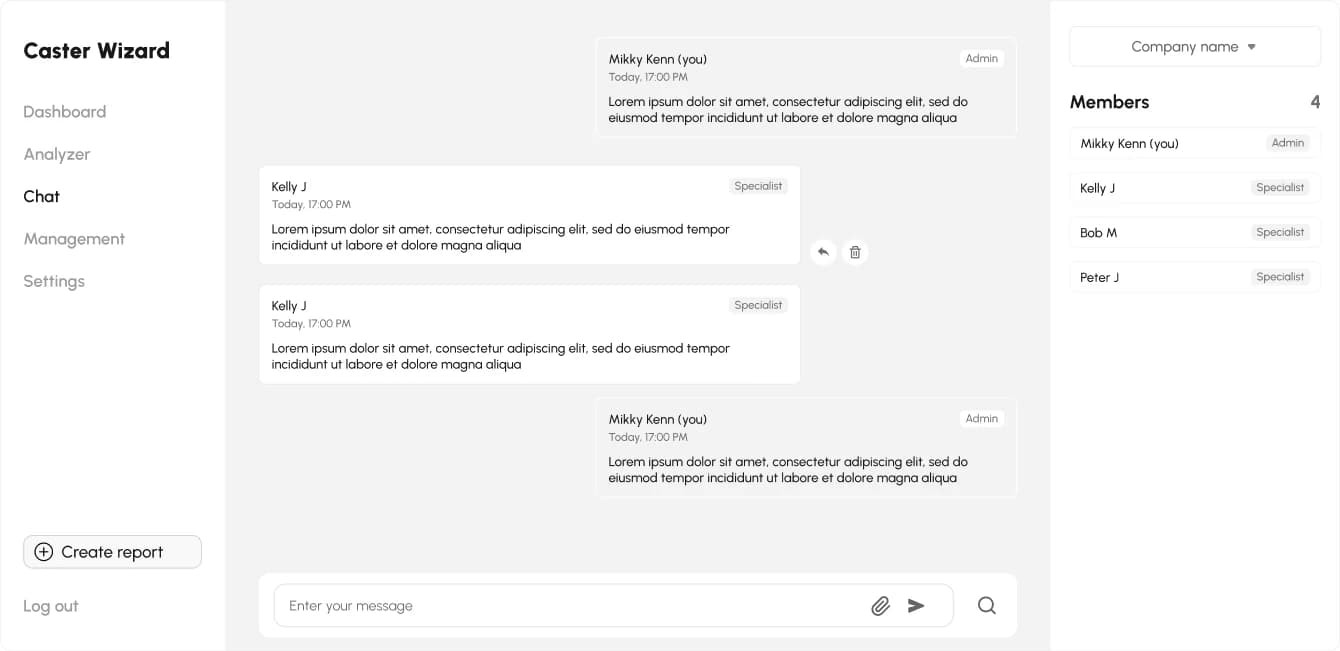
All customer chats in one inbox

Switch between companies and talk to their teams without leaving the panel. The member list shows who is in the conversation and in which role.

Admin chat with company switcher and member list

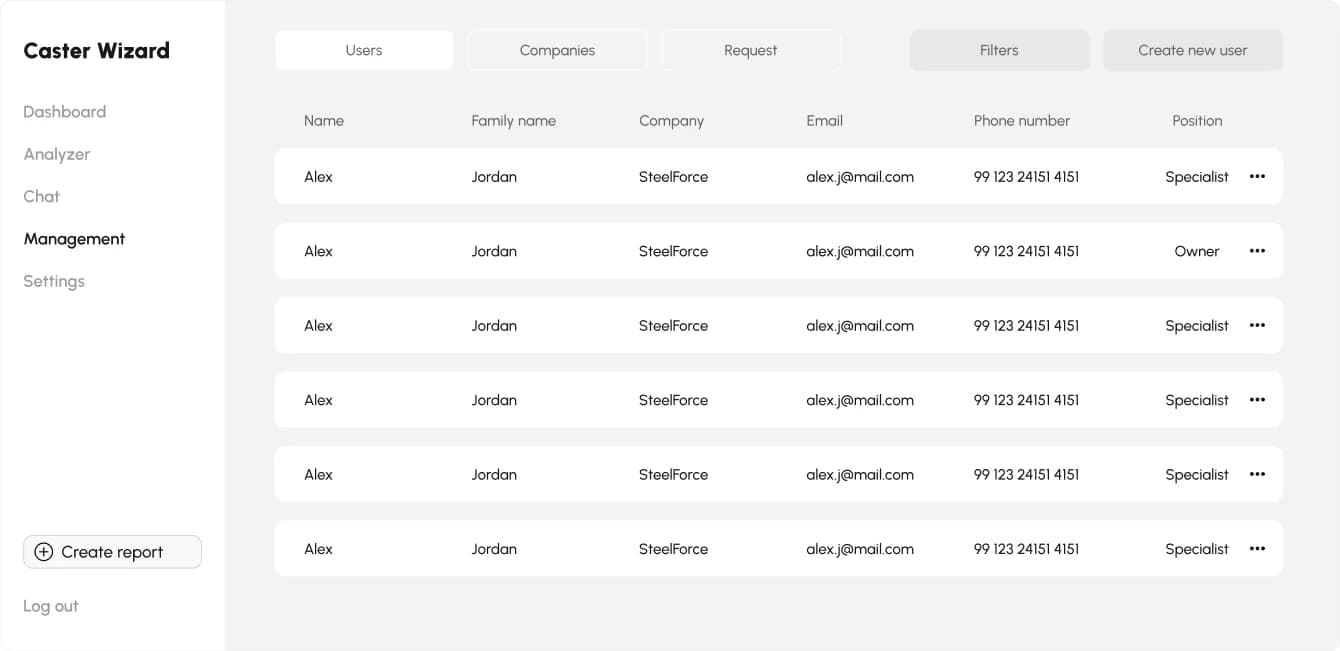
Customers, users and access requests

A new customer is set up in minutes: create the company, add users, assign positions and approve access requests. Access is email-based and can be revoked at any time, which matters when plant staff rotates.

User management with companies, positions and access requests

Tech stack

Why FlutterFlow and Firebase

The goal was to validate a business model, not to fund a year of native development. With FlutterFlow a small team delivered the iOS and Android apps and the web admin panel, while Firebase runs the backend. Under the hood it is real Flutter code that can be exported and extended once the product outgrows low-code.

  • FlutterFlow

    iOS and Android apps and the web admin panel, built visually on top of Flutter.

  • Firebase Auth

    Email-based access per company, revocable at any time.

  • Cloud Firestore

    Reports, chats and roles, synced in real time.

  • Cloud Storage

    Defect photos and attachments in one place.

Results

From a hotline to a digital support product

Support now runs as a structured flow instead of phone calls. Every report arrives with parameters and photos, every answer is stored with recommendations, and the knowledge base grows with each case, even when plant teams change.

  • +50% efficiency and capacity to serve clients, as reported by the client in a verified Clutch review.
  • From break-fix to prevention: recurring patterns show up in the report history before the next breakout.
  • One expert, several plants: new companies, users and roles are set up in the admin panel in minutes.

Roadmap

What's next

Version 2.0 is in planning. Alongside development, we support Caster Wizard with marketing: AI-generated product videos and cross-posting.

  • AI and RAG over the report history: draft analyses and failure prediction
  • Push notifications for processed reports and emerging risks
  • Editable reports with comments and advanced search
  • German and further languages
  • New dashboards for clearer decisions
Client testimonial03

The client on the work

“All deadlines were met.”

Xmethod developed a multidisciplinary mobile app for a steel plant consultancy. The team built the entire app infrastructure for iOS and Android, designed the UI/UX, and created a unique admin panel. Xmethod's work improved the client's efficiency and capacity to interact with clients by 50%. The team met all deadlines and was highly available, flexible, and responsive.

SM✕

Caster Wizard

Steve Münch

Founder · Caster Wizard

Verified review on Clutch · ★ 5.0

Contact05

Let’s discuss your project

Free and non-binding — book a slot straight away or drop us a message.

Dennis Polevik

Dennis Polevik

CEO

What happens next?

  • Reply within 1 business day
  • Short call on your goals
  • Clear proposal, no obligation

PDF, image, document or ZIP — max. 4 MB